
Jewellery catalogue software helps retail jewellers organise product photographs, categories, descriptions, weight, purity and pricing information in a structured system. Depending on the software, it can also connect product records with inventory and billing, making it easier for staff to find items, verify details and manage customer enquiries. Instead of relying on scattered spreadsheets, paper records and phone galleries, a store can use a consistent process to maintain product information.
For a jewellery shop, a catalogue is more than a collection of photographs. Staff may need to identify a particular design, check its recorded weight, confirm its availability and retrieve relevant details during billing. A well-organised catalogue brings these tasks closer together.
However, catalogue features vary from one software product to another. Before choosing a solution, check whether it supports the fields, filters, stock connections and sharing options your store actually needs.
What Is Jewellery Catalogue Software?
Jewellery catalogue software is a digital system for recording, organising and searching product information. A product record may include its code, name, category, photograph, weight, purity, price and other details relevant to the item.
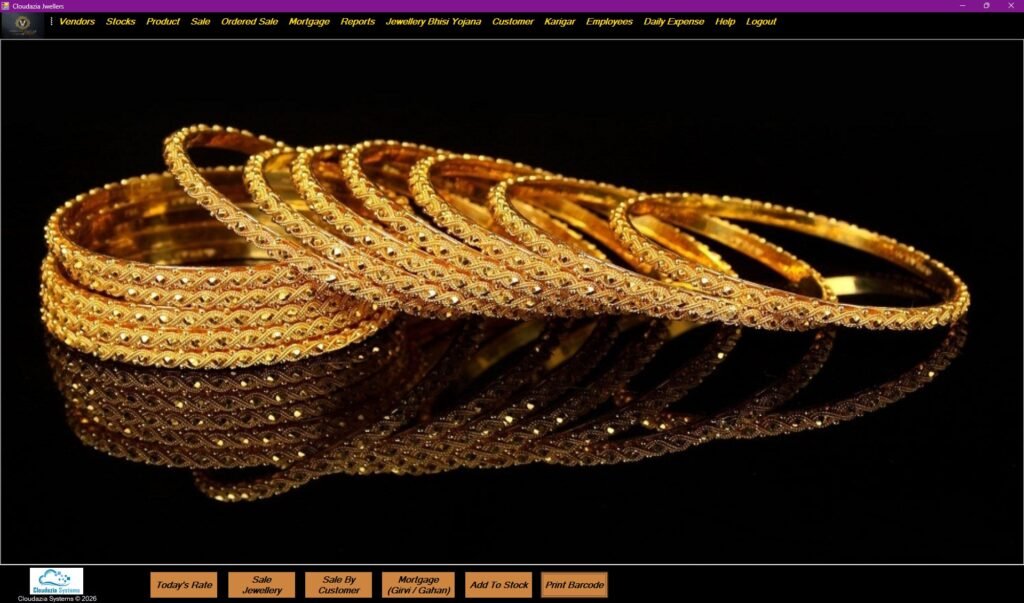
Our Retail Jewellery Management Software Main Dashboard
Unlike a folder containing photographs, a structured catalogue links each image to a specific product record. Staff can search or filter the information instead of opening multiple files to identify a design.
For example, a retailer may stock gold rings, silver chains, diamond earrings and bangles. Staff might need to find all the rings in a particular price range or locate a specific design using its product code. A searchable catalogue can make these tasks easier when the software supports the relevant filters.
Catalogue software can work as a standalone tool or form part of a broader jewellery management system. An integrated system may connect catalogue records with inventory, billing and customer information. Nevertheless, these connections should be confirmed with the software provider rather than assumed.
How Can Jewellery Catalogue Software Help a Retail Jewellery Store Organise Its Products?
The main benefit of a structured catalogue is that staff can find and verify product information without searching through separate records. The following features are useful to evaluate when comparing retail jewellery software.
1. Create a consistent record for every product
Each product or stock item should have a reliable identifier, such as a unique product code. This helps staff distinguish similar-looking designs that may have different weights, purity or prices.
A product record may contain:
- Product code or stock identifier
- Product name and description
- Category, such as rings, necklaces, chains or bangles
- Metal type and applicable purity details
- Gross weight and net weight, where relevant
- Stone or gemstone details, where applicable
- Making charges and other pricing components
- Product photograph
- Stock status, if connected to inventory
- Relevant identification or hallmark details, where applicable
Not every field applies to every product. A plain gold chain, for example, may need different descriptive information from a diamond ring. The goal is to record the information that helps the store identify, price and manage each item correctly.
Consistent product records also help reduce confusion when two designs look similar but have different specifications.
2. Organise products into useful categories
As a store adds more designs, a long, unstructured product list becomes harder to manage. Categories and filters help staff narrow down the results.
Depending on the software, useful options may include:
- Product type: rings, earrings, necklaces, chains and bangles
- Metal or material: gold, silver, platinum or other materials sold by the store
- Purity: the relevant grade or fineness recorded for an item
- Design or collection: bridal, traditional, contemporary or store-defined collections
- Price range: helpful when customers have a specific budget
- Stock status: available, sold, reserved or another supported status
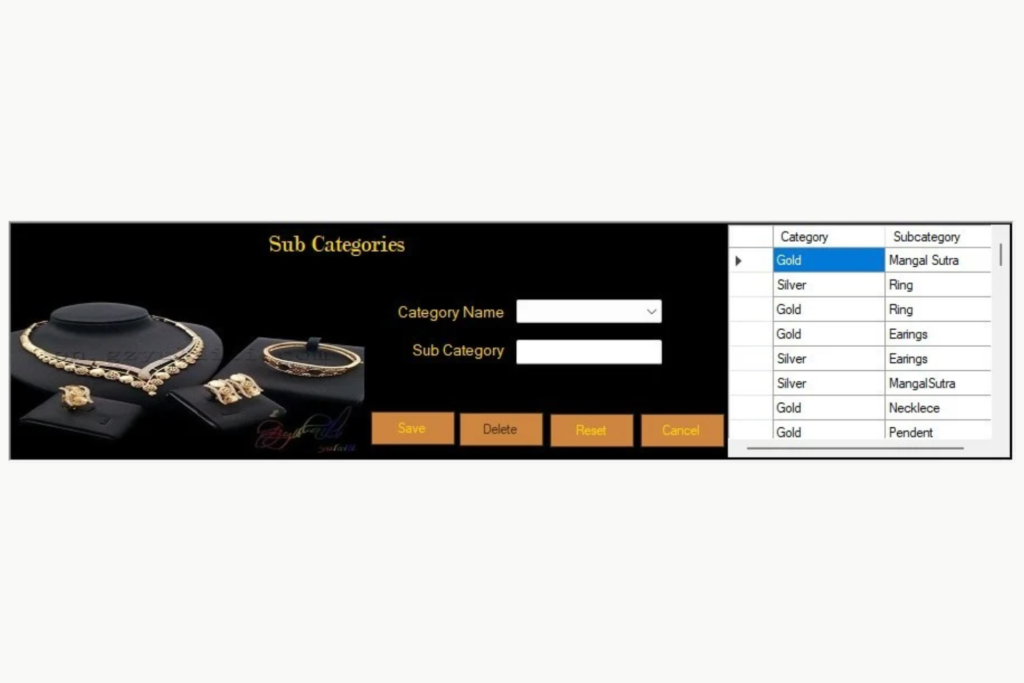
Our Retail Jewellery Management Sub category Dashboard
The right structure depends on the shop’s product range. A retailer specialising in bridal jewellery may need different categories from a store selling everyday jewellery.
During a software demonstration, ask whether staff can use multiple filters together. For example, can they search for gold bangles within a specified price range and then check which matching items are available? Test the actual workflow instead of relying only on the feature list.
3. Link product photographs with accurate details
Product photographs help staff recognise designs and help customers compare options. However, a photograph becomes much more useful when it is linked to the correct product record.
Imagine a customer enquires about a pair of earrings that they saw during an earlier visit. If the product photograph is stored with the item code and description, staff can locate the relevant record more easily than by searching through hundreds of unlabelled images.
To maintain a useful catalogue:
- Use clear photographs that show the design properly.
- Follow a consistent product-code or image-naming convention.
- Link each photograph to the correct product record.
- Update the record when relevant product details change.
- Avoid treating photographs of similar designs as proof that the items have identical specifications.
If the store needs multiple photographs per item, check whether the software supports additional images and allows staff to view them conveniently.
4. Record weight, purity and pricing information correctly
Jewellery pricing may involve several details rather than one fixed price. Depending on the item and the store’s pricing method, a record may need to include metal weight, purity, stone details, making charges and other applicable components.
For example, gross weight and net precious-metal weight are not necessarily the same. A product record should use the correct fields and explain the measurements clearly to staff.
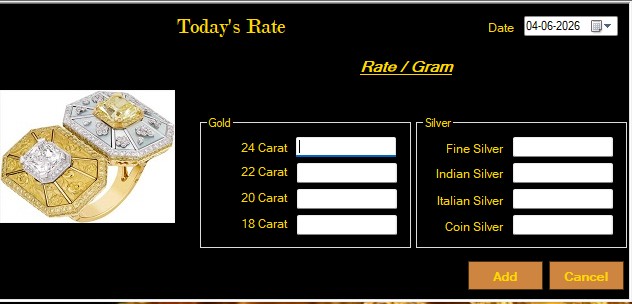
Our gold/silver rate management interface
Purity information should also reflect the actual item and its supporting documentation. The Bureau of Indian Standards (BIS) lists gold jewellery hallmarking grades including 14K (585), 18K (750), 20K (833), 22K (916), 23K (958) and 24KS (995), subject to the applicable standard and requirements.
Where relevant, a catalogue may store the HUID or other identification information. BIS describes HUID as a six-character alphanumeric identifier associated with an applicable hallmarked item. A software record does not, by itself, certify purity or prove that an item has been correctly hallmarked.
Read the official BIS hallmarking FAQs for details about hallmarking and HUID.
5. Keep GST and product information accurate
A catalogue can store product details that staff need during billing, but the catalogue and the tax calculation are not the same thing. The software should use accurate product and transaction information when generating an invoice.
One important point for Indian jewellery retailers is the GST treatment of jewellery sales. The Central Board of Indirect Taxes and Customs (CBIC) states that, for a sale of gold, diamond or silver jewellery to an end consumer, GST is generally charged at 3% of the total transaction value of the jewellery, whether making charges are shown separately or not.
Therefore, an article should not claim that a normal retail jewellery invoice must apply 3% GST to the metal value and a separate 5% GST to making charges. The 5% rate can apply to certain jewellery job-work services, which is a different transaction.
For applicable jewellery articles, HSN heading 7113 covers articles of jewellery and parts made of precious metal or of metal clad with precious metal. It should not be presented as the classification for every product a jewellery store might sell, including all imitation jewellery.
For authoritative guidance, refer to the CBIC sectoral FAQs and verify the classification and tax treatment applicable to the actual transaction with a qualified tax professional.
A useful software demonstration should show how product details flow into the invoice and how the applicable GST is calculated. Do not assume a product is tax-compliant merely because the software has an HSN field or displays a GST amount.
6. Connect the catalogue with inventory
A catalogue explains what a product is. Inventory records help the store track its stock. Connecting these functions can make product information more useful.
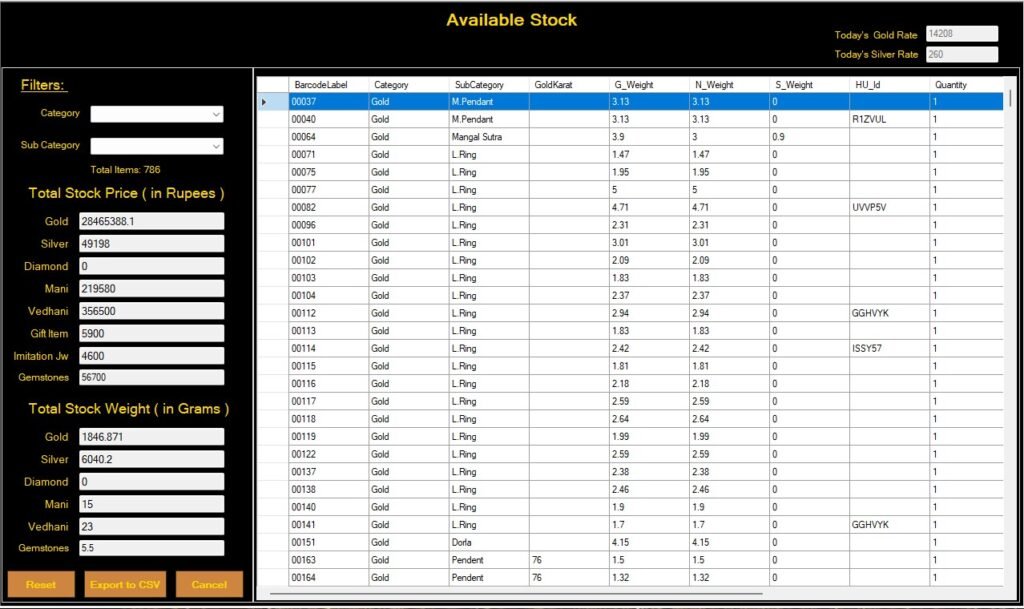
Our Retail Jewellery Management available stock Dashboard
Consider a retailer that has several similar gold bangles. Staff need to identify the correct design and check its stock record. If the catalogue is connected to inventory, they may be able to view product details alongside the recorded stock status.
A properly configured system may also update inventory after a sale or stock receipt. However, automatic updates depend on the software and the workflow being used. Some systems require additional configuration or manual steps.
Ask the provider to demonstrate what happens when:
- A new product is added.
- Stock is received and recorded.
- An item is sold through billing.
- A sale is cancelled or corrected.
- Staff search for the product again.
Check whether the relevant records reflect these changes correctly. This practical test is more reliable than assuming the catalogue always stays synchronised with stock.
For a wider view of the operational features retailers may need, read our guide to jewellery shop software for small and growing retailers.
7. Prepare digital catalogues for customer enquiries
A digital catalogue can help a shop present product photographs and descriptions to customers who want to browse designs before visiting. Depending on the software, staff may be able to export product details, generate a shareable catalogue or share selected products through supported channels.
For example, a customer might ask to see gold chains within a particular budget. Staff could select suitable products, review the recorded details and share the photographs or a digital catalogue if the system supports that workflow.
Before relying on this feature, check:
- Whether the software generates a digital catalogue or only exports product information.
- Whether customers can open the catalogue without a staff login.
- Whether changes to prices or stock are reflected in the shared version.
- Whether the catalogue can be shared through WhatsApp directly or requires a manual export.
- Whether staff can choose which products and details appear.
- Whether a static file must be regenerated when information changes.
A PDF or image may become outdated after a product sells or its price changes. Staff should confirm the information before sending it to a customer.
8. Use product records during billing
A catalogue is more useful when staff can identify the correct item during a sale without entering all the details again. If catalogue, inventory and billing modules are integrated, the system may transfer supported product information into the billing workflow.
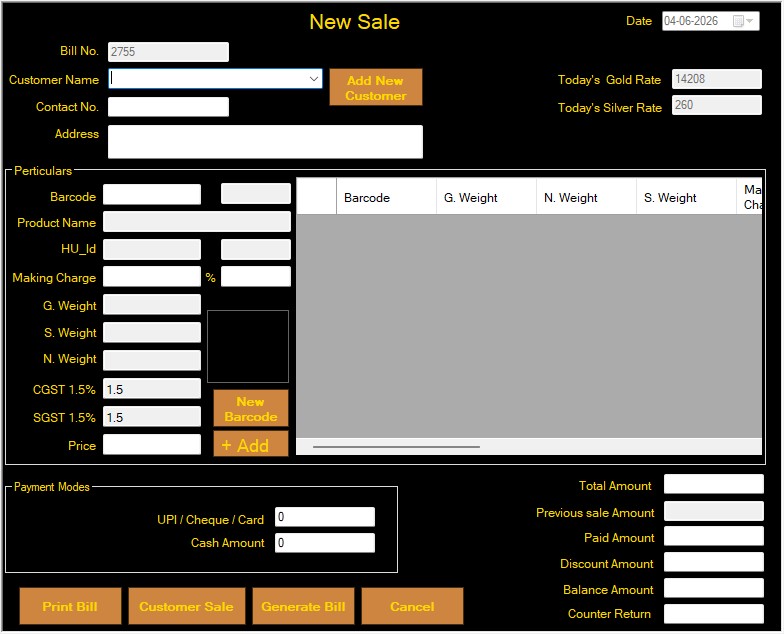
Our New Sale management interface
For example, staff can select a product record and check its relevant weight, purity and pricing details before completing the bill. The exact fields transferred depend on the software and its configuration, so ask the provider to demonstrate the process.
Billing also involves transaction-specific information, including applicable taxes and charges. A catalogue record alone is not a complete invoice and cannot replace the correct treatment of a transaction.
Our guide to jewellery billing software explains the billing features jewellery retailers should review.
Jewellery Catalogue Software vs. Spreadsheets and Photo Folders
Spreadsheets and photo folders can work for a small collection with limited changes. As the number of product records grows, however, staff may find it harder to match photographs, descriptions and stock information consistently.
| Task | Spreadsheet and photo folders | Catalogue software to look for |
|---|---|---|
| Product identification | Details may be stored in separate files | A searchable record with a unique identifier |
| Product photographs | Images may need to be matched manually | Images linked to the relevant product record |
| Category browsing | Filtering depends on spreadsheet structure | Categories and filters suited to the store |
| Stock status | May need a separate stock record | Inventory connection, if supported |
| Customer sharing | Files may need to be selected and sent manually | Catalogue export or sharing features, if supported |
| Billing workflow | Product details may need to be entered again | Product information transfer, if integrated |
| Record maintenance | Updates may need to be repeated in different places | Centralised updates for connected records, depending on the system |
The question is not whether software always offers more features than a spreadsheet. It is whether the chosen system helps your staff maintain accurate information and complete everyday tasks with fewer unnecessary steps.
What Should a Retail Jeweller Check Before Choosing Catalogue Software?
A feature list is a useful starting point, but a practical demonstration is a better way to assess whether a system suits your shop.
Use this checklist when comparing options:
- Product records: Can you record the details relevant to your products?
- Search and filters: Can staff find items by code, category, material, purity or other required attributes?
- Photographs: Can images be linked to the correct record?
- Inventory: Does the catalogue connect to stock? Which changes happen automatically?
- Billing: Can the system transfer relevant product details into a bill?
- GST treatment: Can the provider demonstrate the applicable GST calculation for a normal retail jewellery sale?
- Digital catalogues: Can staff generate and share customer-facing catalogues? Which formats and channels are supported?
- Price maintenance: How are changes to rates and product prices handled?
- User access: Can the business control who adds or changes product records?
- Data export and backup: Can the business retrieve and protect its information?
- Training and support: What onboarding and ongoing support are included?
- Total cost: Are setup, integrations, extra modules or customisation charged separately?
Ask the provider to demonstrate a complete workflow using a sample product. Add its details and photograph, locate it through a category filter, check its stock record, and show how the item is used in billing or a digital catalogue.
This test helps reveal whether the features work together or whether staff must maintain separate records manually.
Common Mistakes to Avoid When Maintaining a Jewellery Catalogue
Even useful software depends on accurate records and consistent processes. A few checks can prevent avoidable confusion.
Using duplicate product codes: Similar designs can have different weights, purity or prices. Use a consistent identification method.
Leaving outdated information in the catalogue: Review photographs, descriptions, prices and availability when the underlying records change.
Mixing up gross and net weight: Record the correct measurement and ensure staff understand the difference.
Applying the same compliance fields to every product: Requirements vary by product. Record relevant information accurately and verify applicable rules instead of using one classification for every item.
Sharing an outdated catalogue: A static file may not reflect recent sales or price changes. Confirm its information before sending it to a customer.
Assuming a GST field guarantees compliance: A field for tax or HSN information does not prove that the classification and calculation are correct. Test the actual invoice workflow and seek professional tax advice where needed.
Buying software based only on a feature list: Ask for a demonstration of the workflows your shop needs rather than assuming every advertised feature is included in every edition.
Frequently Asked Questions
What should an Indian jewellery store look for when choosing catalogue software?
Look for structured product records, useful search filters, photographs linked to each item, relevant weight and purity fields, and a way to connect catalogue information with inventory and billing if needed. If the software calculates GST, ask the provider to demonstrate the correct treatment for your transactions. Also check data export, backups, training and support.
Why do jewellery stores need specialised catalogue software?
Jewellery records often need more detail than a simple product name and quantity. Staff may need to identify designs, distinguish weights and purity, record applicable hallmark information, maintain pricing details and check stock. A specialised system may support these workflows, but confirm the actual features rather than assuming every product is suitable.
What GST information should jewellery catalogue and billing software support?
The catalogue should maintain accurate product details needed by the billing workflow. For a normal retail sale of jewellery to an end consumer, CBIC states that GST is generally 3% of the total transaction value, including making charges whether they are shown separately or not. The applicable HSN classification and tax treatment should be checked for the actual product and transaction. A catalogue field alone does not guarantee a correct GST invoice.
Can jewellery software manage gold and silver rates?
Some jewellery management systems include daily gold and silver rate management. Cloudazia lists daily rate management among its jewellery software capabilities. Before purchasing, ask how rates are entered, which products use them, whether the rates apply to new bills or pending transactions, and how authorised staff control changes.
Can jewellery catalogue software record different jewellery purities?
A suitable system should let the store record relevant purity and fineness details for each item. BIS lists grades including 14K, 18K, 20K, 22K, 23K and 24KS for gold jewellery hallmarking, subject to applicable standards and requirements. Confirm that the system supports the grades and product fields your business actually uses.
Can jewellery software manage hallmark-related product information?
Check whether the software can record relevant hallmark and HUID information for the applicable item. BIS says that mentioning HUID on the invoice is voluntary at present, while specified details such as article description, net precious-metal weight, purity in carat and fineness, and hallmarking charges must be included in invoices for hallmarked precious-metal articles. See the BIS guidance for jewellers for the applicable requirements.
Can jewellery catalogue software connect with inventory and customer records?
Some systems connect product records with inventory, billing and customer management. The exact connection varies. Ask the provider to demonstrate whether a sale changes the stock record and whether customer purchase information is available in the same system. Do not assume every catalogue tool includes these functions.
What reports should a jewellery retailer check for?
For catalogue management, useful views may include product lists by category, stock status and relevant product attributes. If the software also includes inventory and billing, ask whether it provides sales summaries, stock reports and applicable GST reports. Scheme, customer-dues or other reports depend on the wider system and the retailer’s needs.
What should I ask a software provider before purchasing?
Ask the provider to demonstrate product entry, search filters, photographs, inventory connections, billing, GST calculations and catalogue sharing. Also ask about data export, backup, user permissions, training, support, integrations and additional charges. Use a realistic example from your shop to check whether the workflow meets your requirements.
Conclusion: Choose a Catalogue That Fits Your Jewellery Shop
Jewellery catalogue software can help retail jewellers organise product information, find records more easily and present designs to customers consistently. When the catalogue connects with inventory and billing, it may also reduce repeated data entry. These benefits depend on accurate records and the capabilities of the chosen system.
Before making a decision, test the workflows that matter to your shop. Check how staff identify products, maintain weight and purity details, review stock and prepare information for customers. Confirm catalogue sharing, inventory integration and GST-related billing behaviour during the demonstration.
Looking for Jewellery Software for Your Retail Store?
Cloudazia Systems offers jewellery management software for jewellery business workflows, including inventory, billing, customer management, daily rate management and reporting. Explore our Jewellery Management Software page to review the available solutions and discuss your requirements with the team.
Book a demo to review the workflows relevant to your business before making a decision.