An Indian jewellery store should look for jewellery software in India that supports jewellery-specific billing, gold and silver rate management, stock tracking by weight and item, customer records, useful reports and the store’s actual day-to-day processes. It should also help staff maintain relevant purity and hallmark information, where applicable, and produce invoices using the correct GST treatment for the transaction.
The right system depends on whether you operate a retail jewellery shop, a wholesale business or a bullion trading operation. Before buying, identify your main requirements, ask the provider to demonstrate real transactions and verify which features are included in the version you will receive.
This guide explains the essential features to evaluate, the questions to ask a software provider and the common mistakes to avoid when comparing jewellery software.
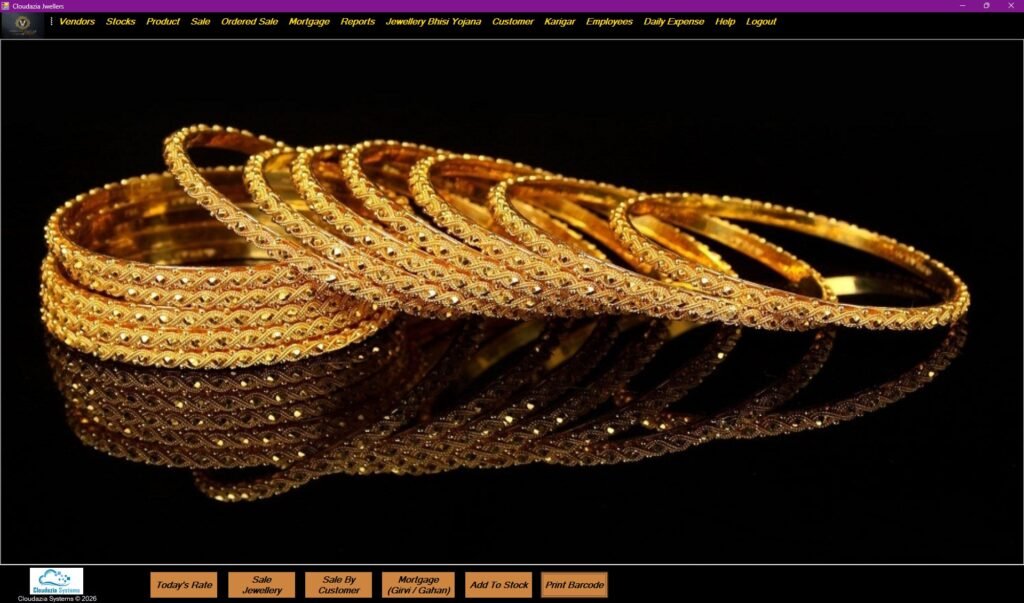
Retail Jewellery Management Software Main Dashboard
Why Do Indian Jewellery Stores Need Specialised Software?
Jewellery businesses handle information that general retail systems may not manage in the same way. Product value can depend on metal type, weight, purity, the applicable rate, making charges, stones and other item-specific details. Stores also need reliable records for purchases, sales, exchanges, customer accounts and stock movements.
A general billing tool may work for basic sales, but it may not cover every workflow a jewellery business needs. Staff might have to maintain separate spreadsheets for stock, customer dues, gold rates or supplier transactions. This creates more work and makes it harder to reconcile records when information is entered in several places.
Specialised jewellery software can bring relevant processes together. However, not every product offers the same features. A retail jeweller may need barcode billing and customer records, while a wholesaler may need karigar work tracking and order management. A bullion dealer may prioritise metal balances, exchange transactions and rate-linked records.
The best starting point is therefore to choose software for your business type rather than selecting a product based on its feature count alone.
What Should Jewellery Software in India Include?
A suitable system should support the core activities of your business and make important information easy to retrieve. Use the following list as a starting point, then prioritise the features that match your shop’s actual workflow.
1. Jewellery inventory and product records
Inventory should capture the information your business needs to identify and value each item. Depending on the product and workflow, that may include:
- Item or design code and description.
- Jewellery category and metal type.
- Gross weight, net weight and stone details, where relevant.
- Purity or karat information.
- Purchase cost, applicable rate and making-charge details.
- Supplier, purchase reference and current stock status.
- Barcode or other item identifier, if used by the store.
Ask how the software handles variations in weight, purity, metal type and item category. Also check how it records purchases, sales, returns, exchanges and stock corrections.
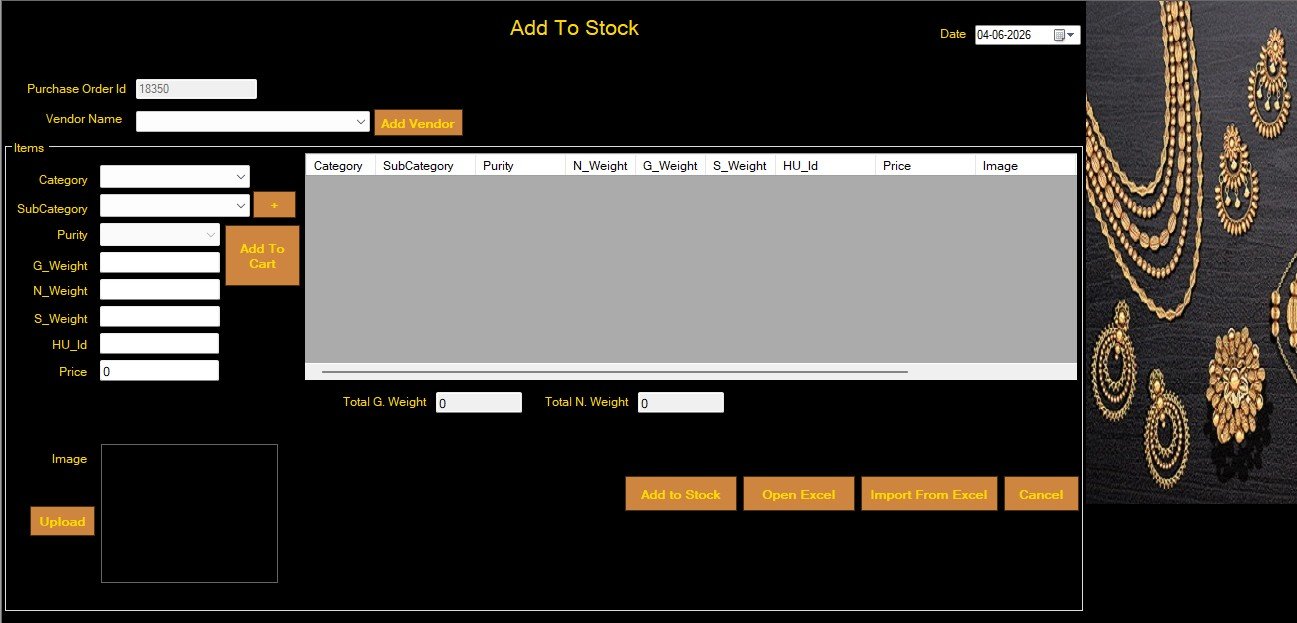
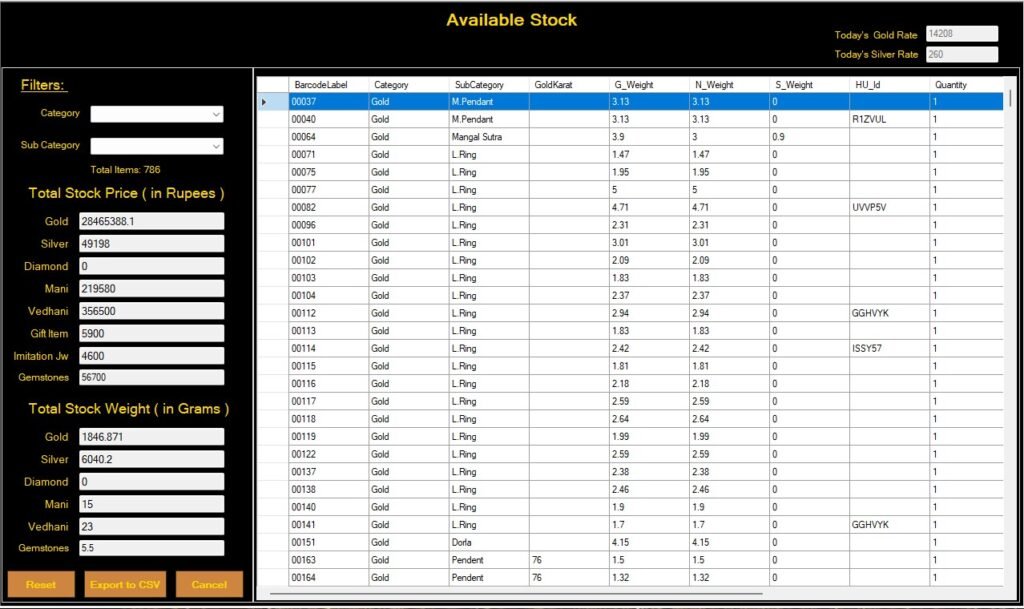
Retail Jewellery Management Inventory & available stock Dashboard
For example, if a necklace is sold, the system should make it possible to identify the relevant item and update the corresponding stock record through the supported billing workflow. Ask the provider to demonstrate this process rather than relying only on a brochure or feature list.
2. Gold and silver rate management
Gold and silver rates can change frequently. Software should make it straightforward for authorised staff to update the rates used by the business and apply the appropriate rate during new transactions.
During a demo, ask whether the rate is entered manually or obtained through an external source, who can change it, how different purities are handled and how rate changes affect pending orders or unbilled transactions.
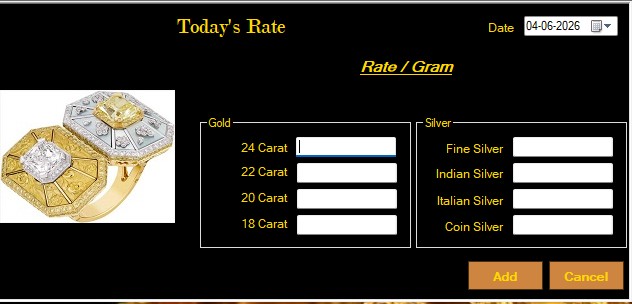
Our gold/silver rate management interface
Do not assume that a product updates rates automatically simply because it has a rate-management screen. Confirm the exact update method and whether any external service or configuration is required.
For related billing considerations, read our guide to jewellery billing software.
3. Correct GST billing and invoice records
GST treatment is an important part of evaluating jewellery billing software. However, the tax calculation should reflect the type of transaction and the applicable rules—not a blanket assumption that metal and making charges always attract different rates.
According to the CBIC sectoral GST FAQ, GST on a normal sale of gold, diamond or silver jewellery to an end consumer is generally 3% of the total transaction value of the jewellery, whether the making charges are shown separately or not. The FAQ separately discusses job-work arrangements, where a registered job worker generally pays 5% GST on job charges. These are different situations and should not be confused.
When evaluating software, ask the provider to demonstrate the tax calculation for a typical retail jewellery sale. Check how the invoice records the taxable value, GST amount, product classification and other details relevant to your transaction. If your business also handles manufacturing or job work, ask how those separate workflows are recorded.
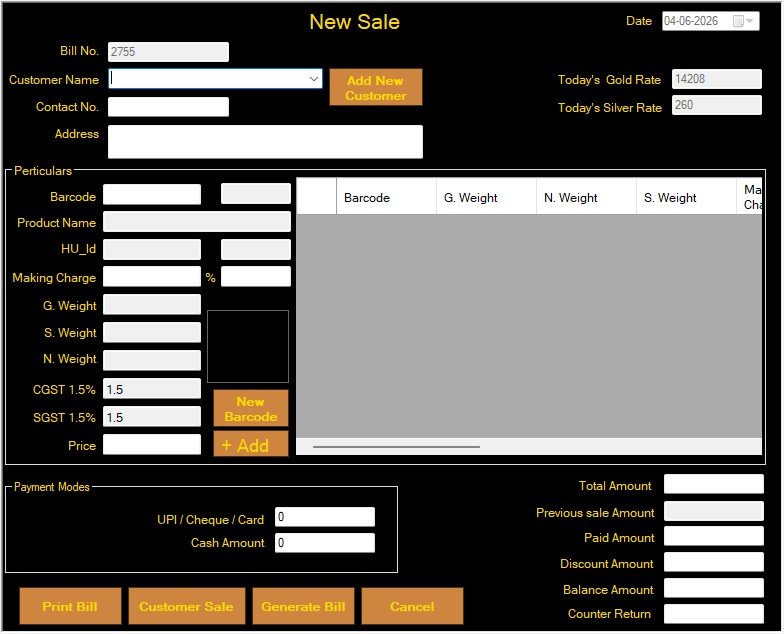
Our New Sale management interface
The appropriate HSN classification depends on the goods and transaction. HSN heading 7113 covers articles of jewellery and parts made of precious metal or metal clad with precious metal; it should not be assumed to apply to every product a jewellery business sells. Review the classification relevant to your products and confirm tax questions with a qualified tax professional.
Important: Software can help calculate and record tax, but it does not replace professional advice on GST classification or filing obligations. Review the invoice output and confirm that the configuration matches your business before using it for live billing.
4. Purity and hallmark information
Purity records help staff distinguish products made from different grades of precious metal and support accurate stock and pricing records. Depending on the product and applicable requirements, the system may also need to store hallmark-related information, including a Hallmark Unique Identification (HUID) number.
Before purchasing, ask whether the software can record the purity details relevant to your stock, where hallmark information is stored and whether it can be retrieved in the required workflow. If you expect HUID information to appear on an invoice, ask the provider to demonstrate that exact process.
Hallmarking requirements can depend on the applicable rules, notified areas, product categories and exemptions. Check current guidance from the Bureau of Indian Standards (BIS) rather than relying on an old statistic or a general statement about every jewellery item.
A software field alone does not establish that a product is hallmarked or that a business has met every applicable requirement. Staff still need to maintain accurate records and follow the relevant process.
5. Billing connected with stock and customer records
Connected workflows can reduce duplicate data entry. When a sale is completed, staff should be able to see the relevant transaction and understand how the software updates the associated stock and customer records.
Ask the provider to demonstrate a complete transaction:
- Find or select a product.
- Generate the bill with the correct item details and applicable tax.
- Record the payment and customer information, where required.
- Check the resulting stock movement.
- Retrieve the invoice and related report.
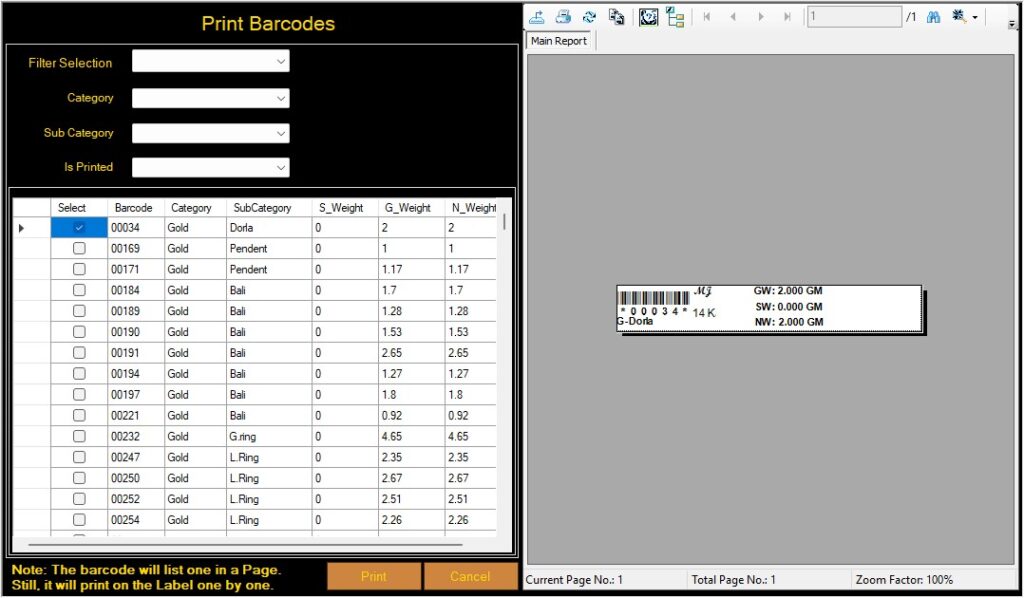
Our Barcode Identification interface for Jewellery Items
This walkthrough can reveal gaps that are not obvious in a feature list. Also ask how the system handles cancellations, returns, exchanges and corrections so that the records remain understandable.
6. Customer, supplier and order management
Customer records can help staff retrieve contact details, purchase history and outstanding amounts, where these functions are supported. Supplier records can help organise purchase history, invoices and payments due.
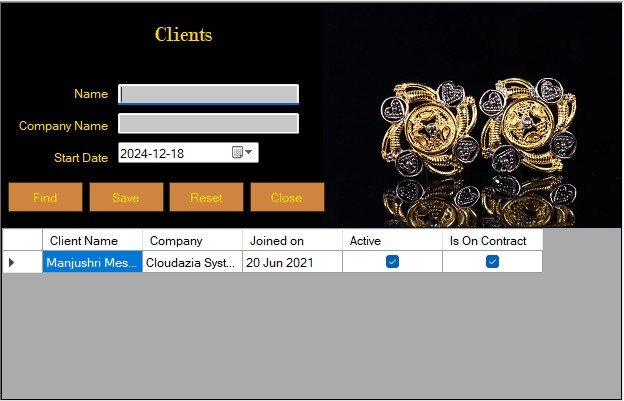
Our Customer Record Management interface
If your store accepts advance bookings or manages orders that are not ready for delivery, check whether the software records the order status, promised date, advance amount and remaining balance. Ask how staff can find overdue orders and review the transaction history.
For retailers who also manage customer payment schemes or Girvi/Gahan records, check whether these workflows are available as dedicated features. They should not be assumed to exist in every jewellery software package.
Our guide to scheme management software for jewellery businesses explains the differences between customer schemes and Girvi/Gahan recordkeeping.
7. Reports, exports and data access
Reports are useful only when they answer questions the business needs to resolve. Ask whether the system can generate the reports relevant to your operation, such as:
- Daily sales and payment summaries.
- Stock reports by item, weight or metal, where supported.
- Purchase and supplier outstanding reports.
- Customer balances and order status.
- GST summaries and transaction records.
- Karigar work, salary or advance reports for relevant wholesale workflows.
- Data exports and accounting-system integrations, where available.
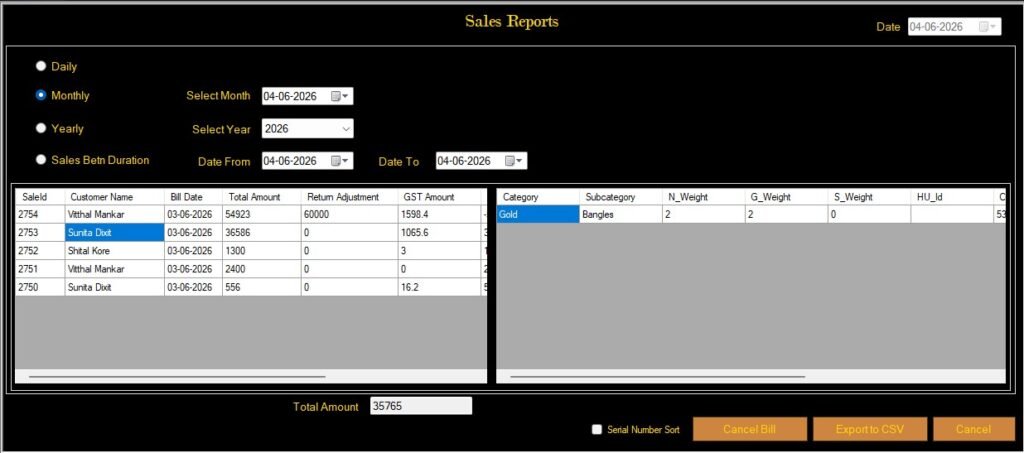
Our sales reports dashboard
Do not assume that every report is included in every edition. Ask for examples using sample data and confirm whether you can export the records in a format your accountant or team can use.
8. User access, backups and support
Before you buy, understand who can access sensitive records and how the software protects business data. Ask about user roles, backup frequency, restoration procedures, data export, updates, support hours and what happens if a computer or internet connection becomes unavailable.
If offline working is essential for your store, request a demonstration of the offline workflow. Do not assume that an application continues to support every function without internet access.
Clarify the total cost as well. Ask what the quoted price includes, whether installation or training costs extra, how renewals and support are charged, and what happens to your data if you stop using the product.
Jewellery Software vs. Generic Retail or Accounting Software
A general retail or accounting system may support some of the activities a jewellery shop needs. The question is whether it supports the jewellery-specific details and workflows without requiring staff to maintain separate records.
| Requirement | What to verify in a general system | What to look for in jewellery software |
|---|---|---|
| Product records | Can it store jewellery-specific attributes? | Relevant metal, weight, purity and item details |
| Rate handling | Can rates be changed and applied reliably? | Rate management that fits your pricing process |
| Billing and GST | Can it calculate the tax applicable to the transaction? | Jewellery billing workflows and clear invoice records |
| Inventory | Can it track stock beyond simple quantities? | Weight, item and metal-level records where needed |
| Customer and orders | Can it retain transaction history? | Customer, booking and order workflows relevant to your shop |
| Reports and exports | Can staff retrieve and share the required records? | Useful sales, stock, payment and accounting reports |
| Support | Is help available when the shop needs it? | Clear onboarding, support terms and training |
This is a comparison checklist, not a claim that every generic system lacks these features or that every specialist product includes them. Evaluate the actual product, edition and configuration before deciding.
For a broader view of retail workflows, see our guide to jewellery shop software for small and growing retailers.
What Should an Indian Jewellery Store Look for When Choosing Jewellery Software?
Use a live demonstration to evaluate the software against the tasks your staff perform every day. A structured checklist makes it easier to compare providers on the same criteria.
Compliance and billing checks
- Ask the provider to demonstrate GST calculation for your typical transactions.
- Verify the invoice details and relevant product classification.
- Check whether the system can store the purity and hallmark information your business needs.
- Review how invoices, returns, exchanges and corrections are recorded.
Operational checks
- Test a stock item from purchase through billing.
- Check how gold and silver rates are updated and applied.
- Review customer, supplier, order and payment workflows.
- Confirm whether reports and exports fit your team’s needs.
- Test offline requirements if they are important to your business.
Vendor and support checks
- Ask for a demonstration using realistic sample transactions.
- Confirm what is included in the quoted software edition.
- Request a clear breakdown of setup, training, renewal and support costs.
- Ask how backups, restoration and data export work.
- Check the provider’s support process and request relevant customer references, where available.
Write down your essential requirements before attending a demo. This makes it easier to compare products fairly and reduces the risk of choosing a system because of one attractive feature while overlooking a critical daily workflow.
Common Mistakes to Avoid When Buying Jewellery Software
Choosing based only on price: A lower upfront cost may not include the training, support, reports or workflows you need. Compare the total cost and the functions included in each quote.
Assuming every feature is standard: Terms such as automatic rate updates, barcode billing, hallmark tracking and scheme management can mean different things across products. Ask to see the exact workflow.
Ignoring migration and data ownership: Find out how existing product, customer and supplier records can be transferred. Confirm how you can export your data if you change providers.
Skipping staff training: A system is only useful when employees understand how to use it correctly. Ask what onboarding is included and how new staff can receive training.
Not testing real transactions: A polished dashboard does not prove that the software handles your day-to-day work. Test a typical bill, return, stock correction, report and any special workflow that matters to your store.
Assuming software guarantees compliance: Software can help maintain records and calculate values, but the business remains responsible for accurate data, appropriate configuration and following the rules that apply to its transactions.
Frequently Asked Questions
Can a small jewellery shop benefit from dedicated software?
Yes. A smaller shop may benefit from organised stock records, faster billing workflows, searchable customer details and easier reporting. The right choice depends on the shop’s transaction volume, budget and operational needs, so prioritise essential functions instead of paying for features you will not use.
Is jewellery software useful if I already use accounting software?
It can be, if your accounting system does not manage the product-level details or counter workflows your shop requires. Before adding another system, check whether the two products can exchange the records you need and how staff will reconcile them.
Can jewellery software manage gold and silver rates?
Many jewellery-specific systems offer rate-management functions, but the update method varies. Ask whether rates are entered manually or supplied through an external source, how purity calculations work and how rate changes affect new bills and pending transactions.
Does jewellery software automatically make every invoice GST-compliant?
No software should be treated as a guarantee of compliance. The system must be configured appropriately, and staff need to enter accurate information. Ask a qualified tax professional to review your transaction types, tax treatment and invoice setup where necessary.
Can the software store HUID and purity details?
Some products may support these fields, but you should confirm their availability and how the information is used. If you need hallmark details to appear on an invoice or report, ask the provider to demonstrate that exact output and check the applicable BIS requirements.
What reports should I check during a software demonstration?
Start with daily sales, stock, purchase, payment and outstanding reports. Add GST summaries, order reports, scheme records or karigar reports if they are relevant to your business. Confirm the filters, date ranges and export formats you need.
How can I compare the total cost of different software options?
Compare the initial licence or subscription price, setup, data migration, training, support, renewals, integrations and paid customisations. Ask for the charges in writing and confirm whether the quoted amount covers the edition and number of users you need.
Is centralised multi-branch management included in every jewellery software product?
No. Some products allow separate installations at different locations, while others provide a central dashboard for managing several branches. Ask the provider to demonstrate the exact multi-branch workflow and confirm whether it is included in the edition you are considering.
What should I prepare before requesting a demo?
Prepare a list of the products you sell, the information you track for each item, your billing and rate-update process, the reports you use and any special workflows such as exchanges, advance bookings or customer schemes. This helps the provider demonstrate relevant tasks rather than only showing a general overview.
Choose Jewellery Software That Fits Your Business
The right jewellery software should make everyday work easier while keeping product, billing, stock and customer information organised. Start with the processes your business depends on most, verify the relevant GST and hallmarking requirements, and test the system using realistic transactions before making a decision.
Cloudazia Systems offers jewellery management software for retail jewellery businesses, wholesalers and bullion traders, with features varying by edition. Explore the Cloudazia jewellery management software solutions to review the available options.
Want to see whether the software fits your workflow? Contact Cloudazia Systems to discuss your requirements and request a product demonstration.