Running a jewellery shop involves more than recording daily sales. Retailers must keep track of purchases, expenses, customer payments, supplier transactions and stock-related records. When these details remain scattered across notebooks and spreadsheets, it becomes harder to understand the financial position of the business.
Jewellery accounting software helps jewellery retailers organise important business transactions and financial records in a structured way. Depending on its features, it can help record sales and purchases, monitor expenses, review customer and supplier balances, and prepare reports for better business decisions.
However, jewellery businesses have requirements that differ from many other retail businesses. Gold and silver rates, purity, product weights, making charges, purchase values and customer advances can all affect how transactions are recorded.
This guide explains what jewellery accounting software should include, how Indian jewellers can maintain daily financial records, and what to check before choosing a solution.
What Is Jewellery Accounting Software?
Jewellery accounting software is a digital system that helps jewellery businesses record, organise and review financial transactions related to their operations. Depending on the solution, it may include sales and purchase records, expense tracking, customer and supplier accounts, payment records, financial reports and accounting integrations.
Unlike basic bookkeeping tools, a jewellery-focused solution should also accommodate the operational details behind jewellery transactions. These may include metal type, gross and net weight, purity, making charges, product value and applicable taxes.
For example, when a retailer sells a gold necklace, the business may need to maintain the invoice details, payment received, customer information and corresponding stock movement. A well-connected business system helps keep these records organised.
The important distinction: jewellery management software and accounting software are related, but they are not automatically the same thing. A jewellery management system may record sales, purchases, stock and expenses without providing every formal accounting function. Retailers should check whether the software supports a complete ledger-based accounting process or connects with a dedicated accounting application.
Which Software Can Help Jewellery Shop Owners Manage Business Accounts and Financial Records?
Jewellery shop owners can use jewellery-focused business management software with accounting features, a dedicated accounting application, or an integrated combination of both.
The right choice depends on the size of the business and the records it needs to maintain. A small retailer may begin with organised sales, purchase, expense and payment records. A growing business may also need general ledgers, bank reconciliation, tax reports, financial statements and accounting software integration.
Before selecting a solution, check whether it can:
- Record daily sales, purchases and business expenses.
- Maintain customer and supplier transaction records.
- Track amounts received, paid and outstanding.
- Organise invoices, receipts and supporting documents.
- Provide useful sales, purchase and expense reports.
- Export or integrate transaction data with accounting software.
- Maintain reliable backups and access to historical records.
For Indian jewellery businesses, the software should also support the transaction and stock information required for their applicable GST and accounting records. The exact requirements depend on the business structure and tax position.
1. How Can Jewellery Accounting Software Help Manage Sales, Purchases, Expenses and Customer Balances?
Jewellery accounting software can bring important transaction records into one organised system. Instead of checking multiple registers, retailers can review recorded sales, purchases, expenses and payment information from a central place, provided the selected software supports these functions.
Sales and payment records
Every jewellery sale should have a clear record of the transaction. Important details may include:
- Invoice or bill number and date.
- Customer details, where applicable.
- Product description and quantity.
- Metal type, purity and weight, where relevant.
- Making charges and applicable taxes.
- Total invoice value.
- Payment mode and amount received.
- Remaining amount, if any.
These records help retailers review daily sales and identify payments that still need attention.
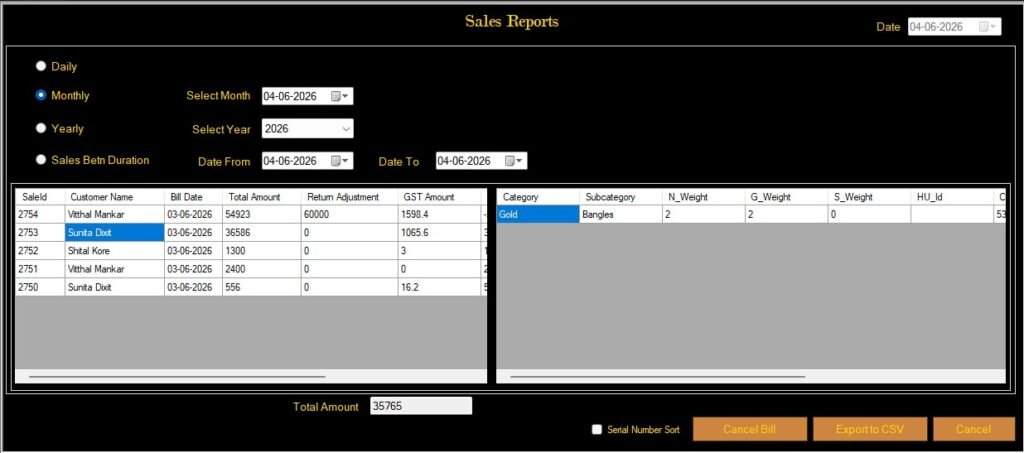
Our Jewellery software Sales reports help jewellery retailers review recorded transactions and monitor business activity.
Purchase and supplier records
Purchase records help a jewellery business understand what it has acquired and what it owes to suppliers.
A useful purchase record may include the supplier name, invoice number, date, item details, quantity or weight, purchase value, applicable tax and payment status.
For jewellery retailers, purchase information should also connect with stock records wherever the software supports that workflow. This makes it easier to compare purchases with available inventory.
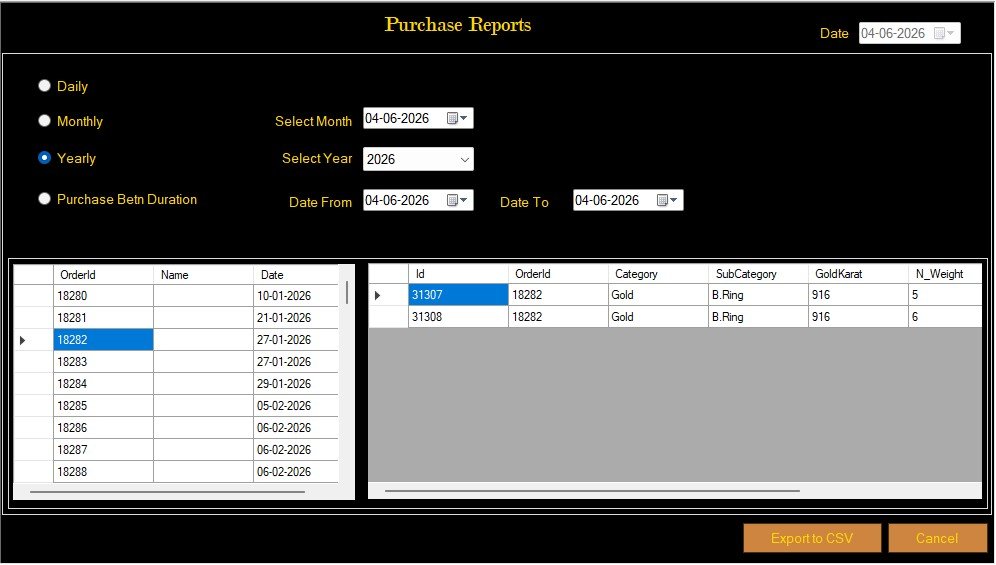
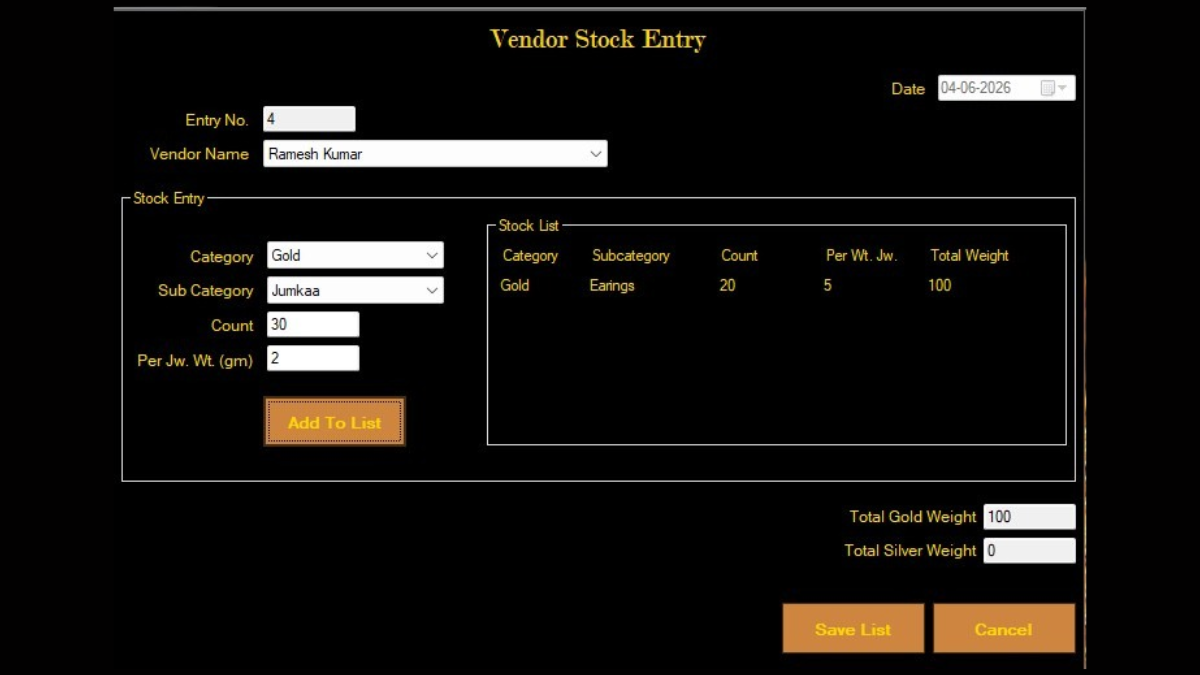
Purchase and vendor records help retailers organise incoming stock and supplier-related information.
Expense tracking
Daily expenses can include shop rent, electricity, salaries, packaging, transport, repairs, maintenance and other operating costs.
Recording expenses with a date, category, amount, payment method and supporting document helps owners understand where business money is being spent.
For example, a retailer who records electricity, staff and transport expenses throughout the month can review the total expense by category instead of estimating it at month-end.
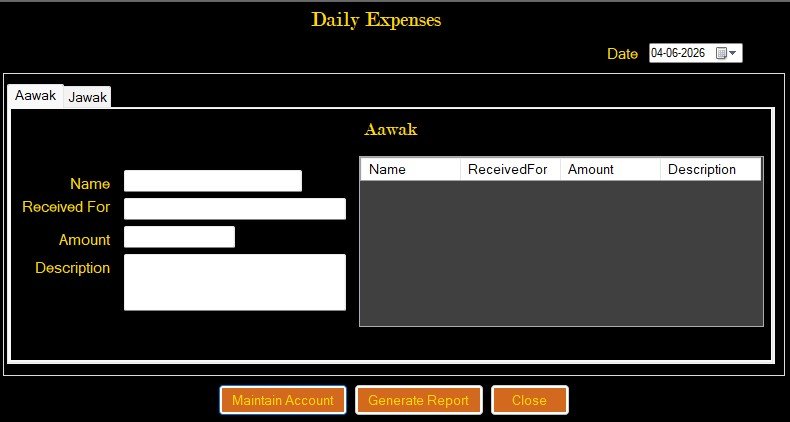
A daily expense entry screen helps retailers maintain records of routine business expenses.
Customer balances and outstanding payments
Customer balances require careful tracking. A retailer should be able to identify the original transaction, amount received, subsequent payments, adjustments and remaining balance.
A useful customer account record should show:
- Customer name or account reference.
- Original invoice or transaction.
- Total amount due.
- Payments received with dates.
- Adjustments, refunds or credit notes, where applicable.
- Current outstanding amount.
Important: A customer balance displayed in an operational system should not automatically be treated as a complete accounting ledger. Check how the software calculates balances and whether it maintains transaction-level history.
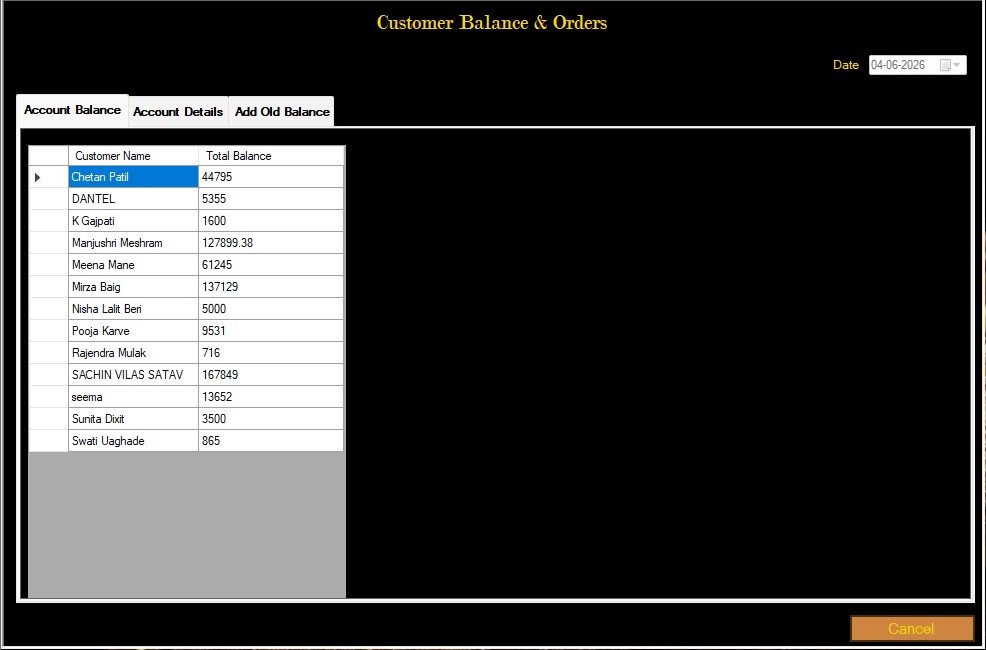
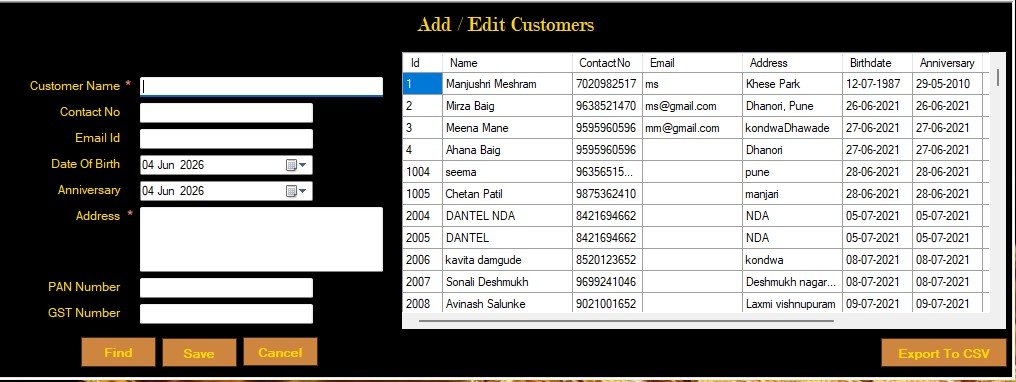
Customer-wise records help retailers review payment information and outstanding balances.
For related guidance, read our Jewellery Billing Software guide, which explains the role of billing records in jewellery retail operations.
2. How Should an Indian Jewellery Shop Owner Maintain Daily Business Records?
An Indian jewellery retailer should follow a consistent process for recording sales, purchases, expenses, payments and stock movements. Recording transactions on the same day reduces the chances of missing entries and makes later reconciliation easier.
A practical daily record-keeping routine can follow these steps.
Step 1: Record every sale
Enter each sale with its invoice details, product information, transaction value, taxes and payment received. Keep the invoice or supporting document linked to the transaction wherever possible.
Step 2: Enter purchases and supplier transactions
Record purchases using supplier invoices and verify the product and quantity details. Update stock records according to the actual goods received and the software’s supported workflow.
Step 3: Record customer receipts and payments
Enter payments against the correct customer or invoice. Avoid maintaining payment information only in informal notes or separate registers.
Step 4: Record daily expenses
Categorise expenses and retain supporting bills or receipts. This makes monthly expense reviews more reliable.
Step 5: Review outstanding balances
Check customer amounts due and supplier payments pending. Investigate differences between the recorded balance and the supporting transaction history.
Step 6: Review daily reports
Compare sales, purchases, expenses and payment collections. Check unusual entries, missing invoices and differences between cash, card, UPI and other payment records.
Step 7: Back up business records
Maintain regular backups and check that historical records can be retrieved. Access controls and a clear record of changes are also important when multiple employees use the system.
Example: A simple daily record
Consider a hypothetical jewellery shop that records the following during one business day:
| Transaction | Amount |
| Jewellery sales | ₹1,20,000 |
| Customer payments received | ₹1,00,000 |
| New purchases | ₹65,000 |
| Shop operating expenses | ₹3,000 |
These figures represent different transaction categories. They should not simply be added or subtracted to calculate profit.
For example, sales value is not the same as money collected, and purchases are not necessarily equal to the cost of goods sold for that day. The retailer must also consider opening stock, closing stock, outstanding amounts, taxes and other accounting adjustments.
This is why organised transaction records and proper accounting treatment matter.
3. What Is the Best Way to Track Outstanding Customer Balances in a Jewellery Shop?
The best approach is to maintain a customer-wise transaction history that connects every outstanding amount to its original bill or transaction.
A single balance figure is not enough. Retailers should be able to see how the balance was created and how it changed over time.
A customer account record should ideally include:
- Customer name and account reference.
- Invoice or transaction number.
- Original amount payable.
- Payment dates and amounts received.
- Adjustments, returns or credit notes.
- Remaining balance.
- Last payment date and transaction history.
Why transaction-wise tracking matters
Suppose a customer purchases jewellery worth ₹80,000 and pays ₹50,000 at the time of purchase. The remaining ₹30,000 should be recorded against the correct transaction.
If the customer later pays ₹10,000, the updated outstanding amount becomes ₹20,000, assuming there are no other adjustments.
This simple example shows why retailers should record each payment against the relevant customer account and transaction.
What should retailers check in customer balance reports?
- Can the report show customer-wise outstanding amounts?
- Can users open the original transaction?
- Are payment dates and amounts visible?
- Can adjustments be traced?
- Can the report be filtered by date or customer?
- Can the information be exported for review?
For businesses offering instalment or jewellery savings schemes, ordinary customer balances may not be sufficient. Scheme contributions, due dates, instalments and settlement records may require separate functionality.
Read our Girvi/Gahan Mortgage and RD Scheme Management guide for more information about scheme-related record management.
4. How Can Jewellery Shop Owners Organise Daily Expenses and Business Reports?
Jewellery retailers can organise expenses and business reports by using consistent categories, recording transactions regularly and reviewing reports at fixed intervals.
Create clear expense categories
Common categories may include:
- Rent and maintenance.
- Electricity and utilities.
- Employee salaries.
- Packaging and stationery.
- Transport and delivery.
- Repairs and equipment.
- Marketing and advertising.
- Professional and administrative expenses.
The categories should reflect the shop’s actual operations. Avoid creating too many overlapping categories because that makes reports harder to interpret.
Review reports regularly
A retailer should review the following reports where available:
| Report | What it helps the retailer understand |
| Sales report | Recorded sales over a selected period |
| Purchase report | Purchases and supplier transactions |
| Expense report | Operating expenses by category |
| Customer balance report | Amounts outstanding from customers |
| Supplier balance report | Amounts payable to suppliers |
| Stock report | Recorded stock quantities and values, where supported |
| Profit and loss statement | Income and expenses classified under accounting rules |
Not every jewellery management application provides all these reports. In particular, a sales report or expense report is not automatically a profit and loss statement.
Understand sales, cash flow and profit separately
These three measures answer different questions.
- Sales show the value of goods or services sold during a period.
- Cash flow shows money received and paid during a period.
- Profit is calculated using recognised income and expenses, including the appropriate cost of goods sold and adjustments.
A shop may record high sales but still have significant outstanding customer payments. Similarly, a purchase payment may affect cash flow without becoming the full expense of that accounting period.
Retailers should review financial statements with their accountant or qualified professional when required.
5. What Should a Jewellery Retailer Check Before Choosing Accounting Software?
Choosing the best accounting software for a jewellery business requires more than comparing prices or looking at a list of features. The software should fit the retailer’s actual transaction process and reporting needs.
Use this checklist before making a decision.
1. Jewellery-specific transaction records
Check whether the software can record relevant jewellery details such as metal type, weight, purity, product information and making charges. Confirm which fields appear in bills, purchase records and reports.
2. Sales and purchase management
Ask whether sales and purchases can be recorded with the necessary invoice and payment details. Check whether the software can connect these transactions with stock records.
3. Customer and supplier accounts
Confirm whether the software maintains customer-wise and supplier-wise transaction histories. Ask how it calculates outstanding amounts and handles partial payments.
4. Expense management
Check whether users can record expenses, assign categories, add descriptions and review expense reports for a selected period.
5. Accounting reports
If you need formal accounting, check whether the software supports general ledgers, journal entries, trial balance, profit and loss statements, balance sheets and other reports required by your accountant.
Do not assume that a dashboard showing sales and expenses includes these accounting functions.
6. GST and tax-related records
Ask how the software handles applicable tax rates, invoice information, tax summaries, credit notes and other records relevant to your business.
A software feature alone does not guarantee GST compliance. Your records and tax treatment should be checked against current requirements with a qualified tax professional.
7. Accounting software integration
If your accountant uses a separate application, check whether the jewellery software can export or integrate the required data.
For example, confirm the supported export format, transaction fields, date ranges and whether the export requires manual adjustments.
8. Data backup and access control
Check how the system stores data, creates backups, restores records and controls employee access. Ask whether changes or deleted entries can be traced.
9. Reports and ease of use
The system should make it easy for authorised users to find transaction details and generate useful reports. Ask for a live demonstration using workflows similar to your shop’s daily operations.
10. Support and future requirements
Consider training, technical support, updates, data migration and the ability to accommodate future business requirements.
A retailer should choose software based on demonstrated workflows rather than relying only on feature lists.
6. Accounting Software for Gold Jewellery: What Makes It Different?
Accounting software for gold jewellery businesses should work alongside jewellery-specific transaction and stock records. Gold transactions involve details that generic accounting tools may not capture by themselves.
Depending on the business model, retailers may need to maintain:
- Gold type and purity.
- Gross weight and net weight.
- Stone or other non-gold weight, where applicable.
- Purchase and sale rates.
- Making charges.
- Wastage or other applicable charges.
- Invoice value and taxes.
- Customer payments and outstanding amounts.
- Stock movement and closing stock records.
For example, a retailer purchasing a gold item should retain the supplier invoice and relevant product details. When that item is sold, the sale record should connect to the corresponding product and transaction information wherever the system supports it.
Why stock and financial records should work together
Stock records help retailers understand what goods they hold. Financial records help them understand the value of transactions and their financial position.
Both matter. However, a stock report alone does not provide a complete accounting valuation. The business should confirm how its software handles stock valuation, purchase costs, wastage, returns and accounting adjustments.
For more information about stock-related workflows, read our guide to Jewellery Inventory Management Software.
How Cloudazia Jewellery Management Software Supports Retail Business Records
Cloudazia Systems provides jewellery management software designed for retail jewellers, wholesale businesses and bullion traders.
Its published retail solution information includes features for managing metals, gemstones and jewellery stock; generating bills, invoices and receipts; creating and printing barcodes; managing customers, vendors and orders; tracking sales, profits and expenses; and backing up, restoring and exporting data to Excel, PDF and Tally.
These capabilities can help jewellery retailers organise important operational records within their jewellery business workflow.
For retailers evaluating accounting-related requirements, the distinction between operational management and formal accounting is important.
Cloudazia’s published product information describes Tally data export. Retailers should confirm the exact export fields, transaction coverage, supported accounting workflow and any configuration requirements during a product demonstration.
Before selecting the software, ask the team to demonstrate the specific reports and customer or supplier balance workflows required by your business. Also confirm whether your chosen edition supports the accounting functions you expect.
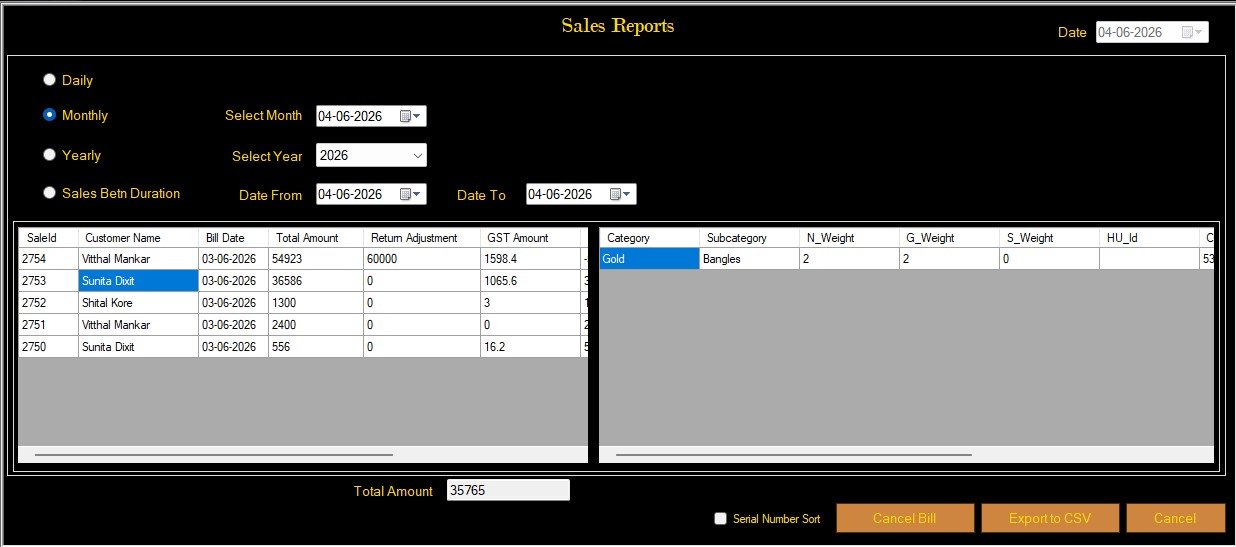
Our jewellery management software reports helps retailers organise operational records and access supported business reports.
Explore Cloudazia Jewellery Management Software to understand the available retail, wholesale and bullion solutions.
Frequently Asked Questions About Jewellery Accounting Software
1. Can jewellery accounting software manage both gold and silver transactions?
Yes, suitable jewellery-focused software can record gold and silver transactions when it supports the required metal, weight, purity, rate and invoice fields. Retailers should verify whether these details also appear correctly in their reports and accounting exports.
2. Is jewellery management software the same as accounting software?
No. Jewellery management software focuses on operational activities such as inventory, billing, customer records and business reports. Accounting software focuses on financial records and accounting processes. Some products combine both, while others integrate with a separate accounting application.
3. Can jewellery software help reduce errors in financial records?
It can help reduce manual data entry and improve record organisation when employees enter transactions correctly and follow consistent processes. However, software cannot guarantee error-free accounts. Regular reviews, reconciliations and appropriate accounting controls remain important.
4. Can I export jewellery business records to Tally?
Some jewellery management systems support exporting data to Tally. The retailer should confirm which transaction types, fields and reports are included, whether the export is direct or requires manual steps, and how the receiving Tally company is configured.
Cloudazia’s published jewellery management software page lists data export to Tally for its retail solution. Confirm the exact export workflow with the Cloudazia team before implementation.
5. How often should a jewellery retailer review business accounts?
Retailers should record transactions as they occur and review important records daily. They should also reconcile bank and payment records regularly and review monthly financial reports with their accountant. The exact frequency depends on transaction volume and business requirements.
6. Can accounting software replace a chartered accountant?
No. Accounting software helps organise and process records, but it does not replace professional judgement, tax advice, statutory compliance work or an accountant’s review. Businesses should consult a qualified professional for accounting and tax matters.
7. What is the difference between an expense report and a profit and loss statement?
An expense report summarises recorded expenses, often by category or date. A profit and loss statement presents income and expenses according to accounting principles to show the business’s profit or loss for a period. An expense report alone is not a substitute for a complete profit and loss statement.
8. Is cloud-based or desktop accounting software better for a jewellery shop?
Neither option is automatically better. The right choice depends on internet availability, data security, backup arrangements, access requirements, business size and integration needs. Retailers should evaluate the actual deployment model and support arrangements before choosing.
Conclusion: Choose Software That Fits Your Jewellery Business
Managing jewellery business accounts requires organised records of sales, purchases, expenses, customer payments and supplier transactions. The right software can make these records easier to maintain and review.
However, retailers should look beyond basic billing and reporting features. They should confirm whether the solution provides formal accounting functions, supports the required GST records, maintains transaction histories and integrates with their accountant’s existing tools.
The best accounting software for a jewellery business is the one that fits its actual workflows, provides reliable records and supports accurate financial review.
Looking for Jewellery Management Software for Your Business?
Organise your jewellery retail operations with Cloudazia Systems. Explore software features for stock management, billing, barcode printing, customer and vendor records, business reports and supported data exports.
Understand your business requirements before choosing your software.
Contact Cloudazia Systems to discuss your jewellery business requirements and request a product demonstration.
Book Your Free Demo Today: +91 92704 06804 | +91 80079 39561