
Managing jewellery inventory involves more than counting products on shelves. Retail jewellers need to maintain accurate records of individual items, metal types, purity, weight, purchase details, sales and available stock. As the number of designs and transactions grows, maintaining all this information in notebooks or separate spreadsheets can become difficult.
Jewellery inventory management software helps retailers organise product and stock records in a structured system. Depending on its capabilities, it can support stock entry, product identification, barcode management, purchase records, available-stock reports and connections with billing.
For Indian jewellery retailers, choosing the right system requires particular attention to gold and silver stock, product purity, gross and net weight, gemstones, vendor purchases and transaction records.
This guide explains how jewellery inventory software works, which features retailers should evaluate, how to maintain stock records and what to check before selecting a solution.
Which Software Can Help Jewellery Retailers Manage Their Inventory in India?
A specialised jewellery inventory management system or an integrated jewellery management solution can help retailers maintain records of jewellery items, metals, gemstones, purchases, sales and available stock.
Unlike basic quantity-based inventory tools, jewellery-focused systems may support additional product information such as metal type, purity, gross weight, net weight, product category and barcode.
When comparing jewellery inventory software, retailers should look for capabilities such as:
- Product-wise stock records
- Gold, silver and gemstone stock management
- Category and subcategory organisation
- Purity and weight-related fields
- Purchase and vendor records
- Barcode creation and product identification
- Available-stock and purchase reports
- Sales records connected with inventory, where supported
- Data backup and export options
The exact features differ between providers and software editions. Therefore, retailers should verify the complete stock workflow through a practical demonstration before purchasing.
What Is Jewellery Inventory Management Software, and How Does It Work?
Jewellery inventory management software is a digital system that helps a jewellery business record, organise and review its stock information.
It provides a structured way to maintain details about products and their movement through business activities. Depending on the software, this may include stock entry, purchase records, barcode identification, sales transactions and stock reports.
For example, a retailer may maintain records for gold rings, silver chains, gemstone earrings and other jewellery items. Each item may have different weights, purity, categories and prices. A suitable inventory system helps staff find and review the relevant information without depending entirely on separate paper records or spreadsheets.
How does the inventory process work?
A typical jewellery inventory workflow may involve the following steps:
- Create product records: Add the item name, category, subcategory and relevant product details.
- Record stock entry: Enter the available item information, such as purity, gross weight, net weight and price, according to the system’s fields.
- Maintain purchase details: Record the vendor and purchase information where the software supports purchase entry.
- Identify products: Create or print barcodes if the system provides barcode functionality.
- Review stock: Use available-stock reports or stock records to check the information maintained in the system.
- Record business transactions: Connect sales and other stock movements with the relevant records where supported.
- Review reports: Use purchase, sales and stock reports to understand the recorded business activity.
The workflow is not identical across all software products. In particular, automatic stock updates after sales, returns or corrections should be demonstrated and verified with the provider.
What Features Should a Jewellery Shop Look for in Inventory Management Software?
A jewellery retailer should evaluate inventory software according to the type of stock it handles and the records required for daily operations.
The following features are important to consider.
1. Jewellery Product-Wise Stock Records
A jewellery inventory system should allow retailers to maintain relevant information for individual products rather than relying only on a general stock quantity.
Useful fields may include:
- Product name or description
- Product code or item identifier
- Category and subcategory
- Metal type
- Purity or fineness
- Gross weight
- Net weight
- Silver weight, where relevant
- Gemstone details, where applicable
- Purchase price or other recorded pricing information
- Barcode or product identification number
For example, two gold rings may look similar but have different weights, purity or product codes. Separate product records help staff identify the correct item and refer to its recorded information.

Cloudazia retail jewellery software stock-entry screen showing product and weight-related fields.
2. Gold and Silver Stock Management
Gold and silver inventory needs more detailed records than a simple count of pieces.
Retailers may need to review stock according to metal type, purity, weight and product category. The information required depends on the products sold and the store’s stock-management method.
When comparing jewellery stock management software, check whether it supports:
- Separate gold and silver product records
- Relevant purity information
- Gross and net weight fields
- Category-wise stock records
- Rate information required by the store
- Reports for reviewing available stock
Also ask how the system distinguishes product quantity from metal weight. A store that tracks both pieces and weight should understand how these values appear in its stock reports.
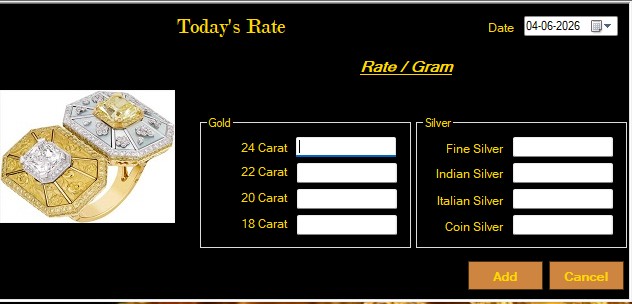
Cloudazia jewellery software interface for managing gold and silver rates.
3. Category and Subcategory Management
A jewellery store may maintain many types of products, including rings, necklaces, earrings, bangles, chains and other designs.
Categories and subcategories help organise these products and make stock records easier to review.
For example, a store might organise its products as follows:
| Main category | Possible subcategories |
| Gold Jewellery | Rings, Chains, Bangles, Necklaces |
| Silver Jewellery | Anklets, Chains, Articles |
| Gemstone Jewellery | Rings, Earrings, Pendants |
| Other Stock | Store-defined product groups |
The exact category structure should match the store’s product range.
Before selecting a jewellery inventory management system, check whether staff can create and maintain the categories and subcategories they actually use.
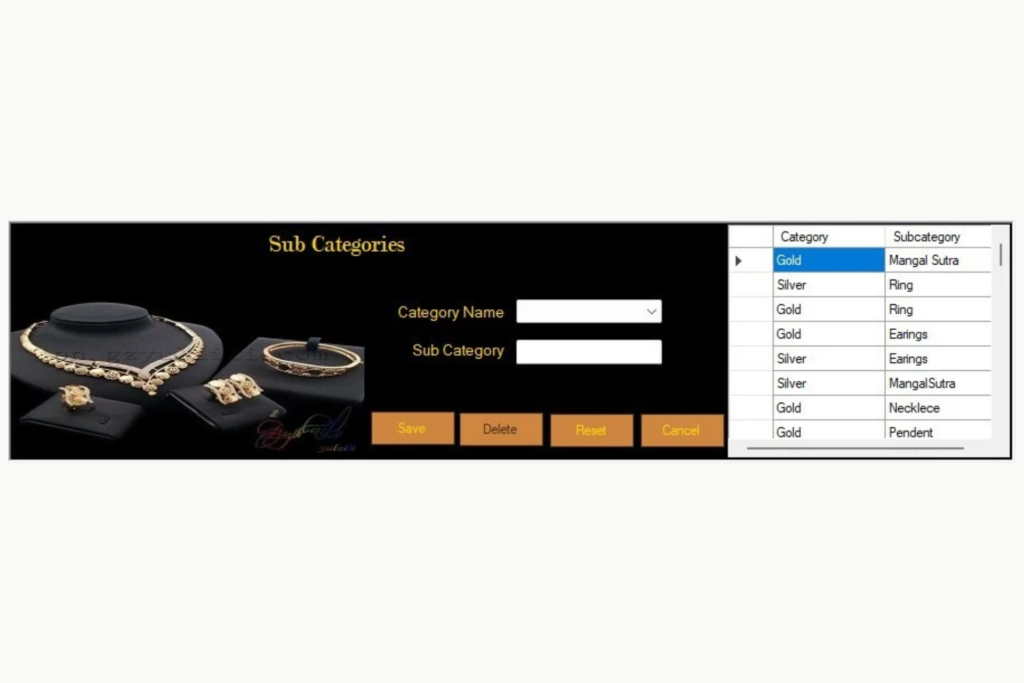
Our Retail Jewellery Management Sub category Dashboard
4. Barcode Creation and Product Identification
Barcode functionality can help staff identify jewellery items and retrieve the associated product records.
Instead of searching through a long product list, staff may be able to use a barcode to locate an item, provided the software supports compatible scanning hardware and the barcode is correctly linked to the product.
When evaluating barcode-based inventory management, check whether the software can:
- Create product barcodes
- Print barcode labels
- Associate a barcode with the correct stock record
- Retrieve the product record using a compatible scanner
- Support the barcode printer and scanner used by the store
Barcode printing and scanning are not necessarily the same feature. Ask the provider to demonstrate both if your store needs a complete scanning workflow.
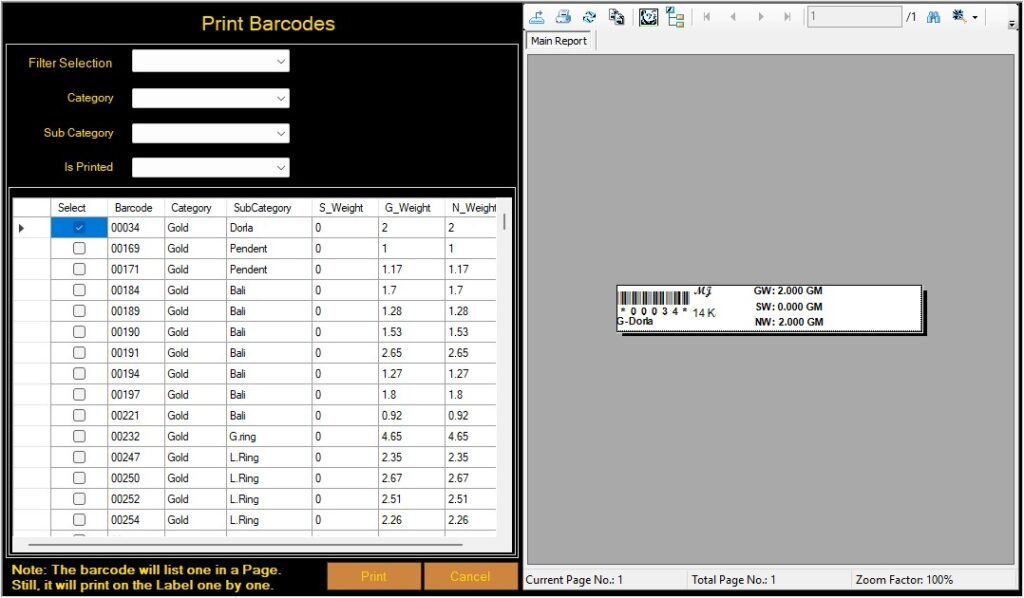
Cloudazia retail jewellery software barcode printing interface
5. Purchase and Vendor Stock Records
Purchase records help retailers understand how stock enters the business and where it was purchased from.
A jewellery inventory system may allow staff to record purchase-related information such as vendor, purchase order, product category, purity, weight and price.
These details can help the business review recorded purchases and refer to the relevant stock-entry information.
When comparing software, ask:
- Can staff record vendor details?
- Can purchase orders be maintained?
- Can products be entered against a purchase record?
- Can purchase information be reviewed through reports?
- Can vendor-related stock records be accessed?
- How are corrections and returns recorded?
The exact purchase workflow differs between providers. Confirm whether the system supports direct purchase entry, vendor stock entry or both.
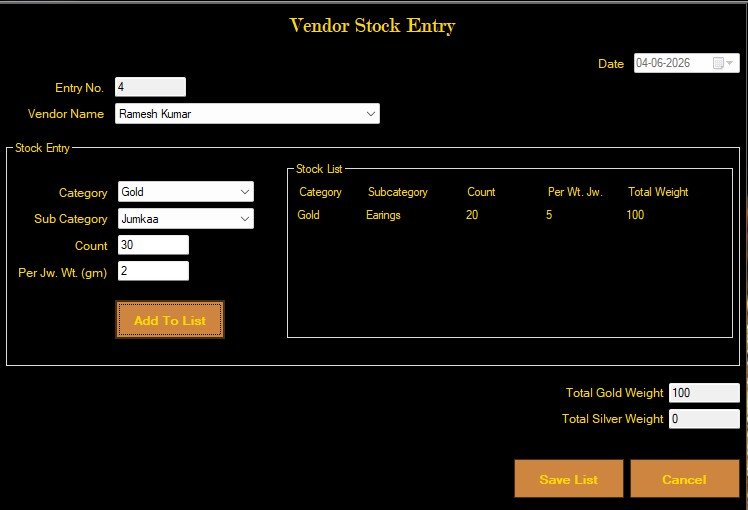
Our retail jewellery vendor stock entry interface
6. Available Stock Reports
A useful inventory system should provide a practical way to review the stock information maintained in the software.
Depending on the product, reports may help staff view:
- Available stock records
- Product-wise stock information
- Category-wise stock information
- Purchase records
- Vendor stock records
- Relevant weight and purity details
Before purchasing, ask the provider to demonstrate how users find an item in the available-stock report and which fields can be reviewed.
Also check whether reports can be filtered, printed or exported into the formats your business needs.
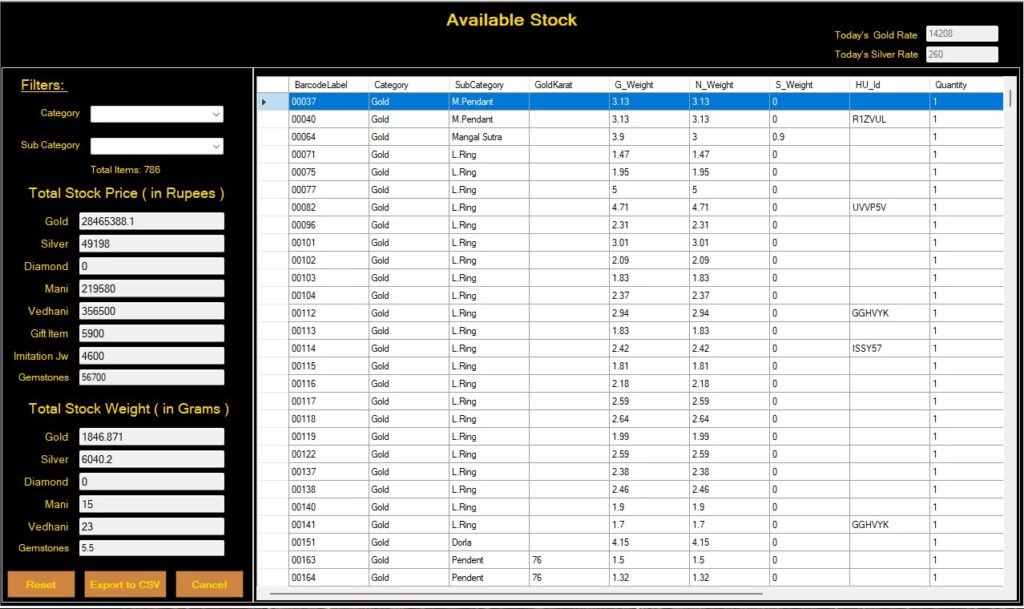
Our jewellery software available stock report dashboard
7. Sales Records and Inventory Review
Sales transactions are an important part of inventory management because they affect the stock a retailer has available.
A connected system may link sales records with inventory information. However, the exact stock update process depends on the software’s configuration and transaction workflow.
Ask the provider to demonstrate:
- How an item is selected during a sale
- Which stock details appear on the sales screen
- What happens to the stock record after a completed sale
- How cancelled or corrected transactions are handled
- Whether the updated record appears in available-stock reports
This is especially important for retailers who maintain stock by both piece count and weight.
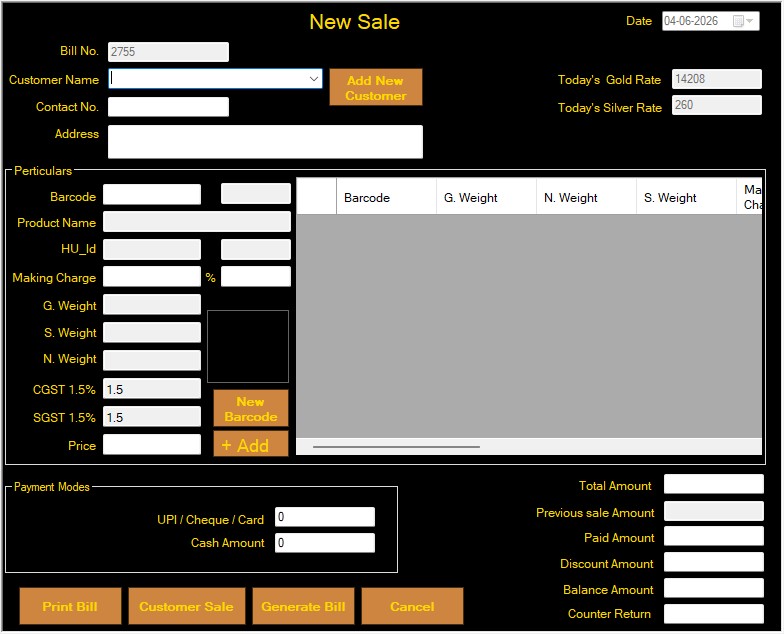
Our Sales Management interface
8. Data Backup, Export and Record Access
Inventory records are important business information. Retailers should understand how the software protects and makes these records available.
Before purchasing, check:
- Whether backup and restore options are available
- How users can export stock information
- Which export formats are supported
- Whether users can retrieve records when needed
- What happens if a computer or system fails
- Whether backup is manual or automated
Also ask whether export options apply to all stock records or only selected reports.
Cloudazia’s retail product page lists backup, restore and export options for Excel, PDF and Tally. Confirm the exact export scope and restore process during a demonstration.
How Can Jewellery Retailers Track Available Gold and Silver Stock?
Jewellery retailers can track gold and silver stock by maintaining consistent item records and reviewing stock reports that show the relevant product and weight information.
A practical stock record may include:
| Stock information | Why it matters |
| Product code | Helps identify an individual item |
| Product category | Organises different jewellery types |
| Metal type | Distinguishes gold, silver and other stock |
| Purity | Records the relevant metal grade |
| Gross weight | Records the item’s total weight |
| Net weight | Records the relevant net metal weight |
| Quantity | Shows the recorded number of pieces |
| Purchase details | Helps trace stock entry |
| Stock status | Shows the status supported by the system |
For better record consistency, retailers should use a standard process for entering new stock, correcting details and recording sales or returns.
It is also important to distinguish between physical stock and recorded stock. A software report reflects the information entered into the system. Retailers should periodically compare system records with physical stock through their own stock-verification process.
This helps identify missing entries, duplicate records, incorrect weights or transactions that need review.
How Does Barcode-Based Inventory Management Help Jewellery Stores?
Barcode-based inventory management can help jewellery retailers identify products more consistently and retrieve their associated stock records.
When each item has a correctly linked barcode, staff can use it to locate the relevant product information, provided the software and scanning hardware support that workflow.
Potential benefits include:
- Easier product identification
- Less dependence on manual product searches
- More consistent item references
- Faster retrieval of product records
- Better organisation of barcode-labelled stock
However, barcode functionality depends on accurate product data, correct label printing and compatible hardware.
A barcode does not automatically guarantee accurate inventory. The underlying stock record must be correct, and the store must follow a consistent process for recording purchases, sales, returns and adjustments.
How Can Jewellery Shop Owners Maintain Accurate Purchase and Sales Stock Records?
Accurate stock records depend on both the software and the processes followed by staff.
The following practices can help jewellery retailers maintain more consistent records.
1. Use a consistent product identification method
Assign a unique product code or supported barcode to each item. Avoid using the same identifier for products with different weights, purity or specifications.
2. Enter product details carefully
Record the correct category, metal type, purity and weight. Pay particular attention to gross and net weight because they represent different measurements.
3. Record purchases promptly
Enter stock received from vendors through the appropriate purchase or stock-entry process. Check the quantity and weight information against the supporting purchase documents.
4. Review sales and returns
Follow the software’s process for completed sales, cancellations, returns and corrections. Confirm how each transaction affects the relevant stock record.
5. Compare physical and recorded stock
Conduct periodic physical stock checks and compare the results with the software’s available-stock records.
6. Review inventory reports
Use available stock, purchase and vendor reports to identify records that require checking.
7. Maintain backups
Follow the software provider’s recommended backup process and periodically verify that the business can retrieve the required records.
These practices are useful regardless of the software selected. A digital system can organise information, but accurate records still depend on correct data entry and consistent business procedures.
Jewellery Inventory Software vs. Spreadsheet-Based Stock Management
Spreadsheets can work for a small product collection with limited transactions. However, as a jewellery store grows, staff may need more structured product records, barcode identification, purchase records and reporting.
| Area | Spreadsheet-based records | Jewellery inventory software |
| Product details | Maintained in rows and columns | Structured product records, depending on the system |
| Product identification | Manual search or spreadsheet filters | Product codes and barcode features, where supported |
| Metal and purity details | Entered manually | Dedicated fields, where available |
| Purchase records | Separate sheets may be required | Purchase and vendor modules, where supported |
| Available stock | Depends on manual updates and formulas | Stock reports based on recorded transactions |
| Barcode management | Usually needs a separate process | Barcode creation and printing, where included |
| Reporting | Often requires manual preparation | Available stock and purchase reports, depending on the product |
| Backup and export | Depends on file-management practices | Backup, restore and export options, where supported |
The right choice depends on the size of the store, the volume of stock, the number of staff and the complexity of its records.
A spreadsheet is not automatically unsuitable for every retailer. The important question is whether the current process can maintain accurate, accessible records as the business grows.
What Should Retail Jewellers Check Before Choosing Inventory Management Software?
Before purchasing jewellery inventory software, compare providers using a practical checklist.
| Requirement | Question to ask the provider |
| Product records | Can the system maintain the product details my store needs? |
| Gold and silver | Can stock be recorded by metal type, purity and weight? |
| Categories | Can I create the categories and subcategories used by my shop? |
| Barcode | Can the system create and print labels and retrieve product records? |
| Purchase entry | Can purchases and vendor information be maintained? |
| Stock reports | Can I review available stock and product details? |
| Sales connection | What happens to stock records after a sale? |
| Returns and corrections | How are cancelled or corrected transactions handled? |
| Data export | Which records can be exported, and in which formats? |
| Backup | How are records backed up and restored? |
| User access | Can access to stock-related functions be controlled? |
| Training and support | What onboarding and ongoing assistance are included? |
| Total cost | Are installation, hardware, integrations or additional modules charged separately? |
Test the software with a practical stock example
Do not select a system based only on a feature list. Ask each provider to demonstrate the same sample product workflow.
For example:
- Add a gold jewellery item with its relevant product details.
- Record its purity and weight.
- Enter the purchase or vendor information, if supported.
- Generate and print a barcode.
- Locate the product during a sales demonstration.
- Review the relevant stock and sales records.
- Check what happens after a correction or cancellation.
- Open the available-stock report and review the recorded information.
This process helps you understand how the different functions work together and which steps require manual action.
For a wider comparison of software options, read our guide to Top 10 Jewellery Software in India.
How Cloudazia Retail Jewellery Management Software Supports Stock Management
Cloudazia Systems offers Retail Jewellery Management Software with capabilities for managing jewellery, metal and gemstone stock, creating and printing barcodes, maintaining customer and vendor records, managing orders and reviewing business reports.
The retail product page lists the following capabilities:
- Manage metals, gemstones and jewellery stock
- Generate bills, invoices and receipts
- Create and print barcodes
- Manage customers, vendors and orders
- Track sales, profits and expenses
- Back up, restore and export data to Excel, PDF and Tally
The retail interface also includes stock-entry, category, barcode, rate-management, purchase, sales and stock-report screens.
These screens can help retailers understand how the software organises stock-related information. The exact workflow and any automatic updates should be verified in a product demonstration.
Retail stock-management screens to explore
- Add to Stock: Review the available product and weight-related entry fields.
- Subcategories: See how product groups can be organised.
- Print Barcodes: Review the barcode creation and printing interface.
- Today’s Rate: View the rate-management screen.
- Purchase Report: Review the available purchase records.
- Available Stock Report: See the stock information available in the reporting interface.
- Vendor Stock Report: Review vendor-related stock information, where applicable.
- Sale: Examine the product and transaction fields used during sales entry.
Explore Cloudazia Retail Jewellery Management Software to learn more about its retail capabilities.
If you are evaluating inventory software for your store, request a demonstration using your own product categories and stock-entry requirements.
Frequently Asked Questions About Jewellery Inventory Management Software
1. What is the best way to manage jewellery stock in a retail shop?
The best approach is to maintain consistent product records containing the relevant item code, category, metal type, purity, weight and purchase information. Retailers should also record stock movements correctly, review available-stock reports and periodically compare digital records with physical stock.
Jewellery inventory management software can help organise these records, provided the selected system supports the store’s requirements.
2. Can jewellery inventory software track both pieces and metal weight?
Some jewellery inventory systems support both item quantity and weight-related fields. Retailers should check whether the software records gross weight, net weight and the relevant metal information separately. Ask the provider to demonstrate how these values appear in stock reports.
3. How often should a jewellery store verify its physical stock?
A jewellery retailer should establish a regular stock-verification schedule based on its stock volume, transaction activity and internal procedures. The frequency may differ between businesses. The important practice is to compare physical items with recorded stock and investigate discrepancies promptly.
4. Can jewellery inventory software manage gemstones and diamond stock?
Some jewellery management systems support gemstone and diamond stock records. Before purchasing, check which product attributes can be maintained, such as product type, description, weight and other relevant identification details. Do not assume every software edition includes specialised diamond grading or certification management.
5. What is the difference between gross weight and net weight in jewellery inventory?
Gross weight refers to the total weight of the jewellery item, while net weight refers to the relevant metal weight after accounting for non-metal components according to the applicable measurement method. Retailers should record the correct measurements and confirm how their software defines and displays each field.
6. Can barcode software help prevent stock-record errors?
Barcode functionality can help staff identify products more consistently, but it cannot prevent every inventory error. Accurate product entry, correct barcode association, compatible scanning hardware and proper transaction recording remain important.
7. Can jewellery inventory software maintain vendor and purchase records?
Some jewellery management systems include vendor and purchase-related modules. These may help retailers maintain supplier information, purchase orders and stock-entry records. Confirm which records are supported and whether purchase information can be reviewed through reports.
8. Is jewellery inventory management software suitable for small shops?
Yes, it can be suitable for a small jewellery retailer if the features match the store’s actual requirements and budget. A smaller shop may prioritise product records, weight details, barcode printing, purchase entry and available-stock reports rather than purchasing a larger system with modules it does not need.
9. Can jewellery stock software export inventory reports?
Export options depend on the software. Some systems allow users to export records or reports into formats such as Excel or PDF. Before purchasing, check which specific stock reports can be exported and whether the export includes the fields your business needs.
Conclusion: Choose Jewellery Inventory Software That Fits Your Store
Jewellery inventory management software can help retailers organise product records, maintain purchase information, identify stock through barcodes and review available inventory. The value of the system depends on the accuracy of the records and how well its features support the store’s everyday stock processes.
Before choosing a solution, evaluate its ability to maintain gold and silver details, purity, weight, categories, vendor records, purchase information and stock reports. Most importantly, test the complete workflow with a realistic product example.
Cloudazia Systems provides Retail Jewellery Management Software with stock management, barcode printing, purchase-related records and reporting capabilities.
Explore the Cloudazia Jewellery Management Software page or contact the team to discuss your retail inventory requirements and arrange a product demonstration.