
Choosing the right jewellery POS software involves more than generating bills. A jewellery store needs a reliable way to identify products, maintain relevant item details, process customer transactions and review daily sales records.
Unlike many general retail businesses, jewellery retailers may need to consider metal type, purity, gross weight, net weight, making charges, applicable taxes and product-specific pricing during a sale. A suitable point-of-sale (POS) system should support these requirements while fitting into the store’s existing billing and inventory workflow.
For Indian jewellers, the right POS solution depends on the products they sell, the way they calculate prices, their billing process and the level of integration they require.
This guide explains how jewellery POS systems work, which features to evaluate, what questions to ask software providers and how to choose a solution that fits your store.
What Is Jewellery POS Software?
Jewellery POS software is a point-of-sale system that helps jewellery retailers manage in-store sales transactions, product identification, billing and sales records.
Depending on the software, it may support jewellery-specific product information such as metal type, purity, weight, barcode, pricing components and customer details.
Common capabilities to evaluate include:
- Jewellery product and item records
- Barcode creation and product identification
- Sales entry and invoice generation
- Gold and silver rate management
- Customer information
- Payment and transaction records
- Sales reports
- Inventory integration, where supported
Some POS products focus mainly on billing, while others connect sales with inventory, purchase, customer and wider jewellery management modules.
The important distinction is not how many features a provider lists. It is whether the software supports the actual activities your staff perform at the jewellery counter.
How Does a Jewellery POS System Work?
A jewellery POS system supports the process of identifying an item, entering transaction information, preparing an invoice and recording the completed sale.
A typical jewellery retail workflow may include these steps:
- Product identification: Staff search for a jewellery item or retrieve its product record using a barcode, depending on the available functionality.
- Product detail verification: They check the relevant details, such as item description, category, purity and weight.
- Rate and pricing entry: The applicable metal rate and other pricing components are entered or retrieved according to the store’s configured process.
- Sales entry: Staff enter the transaction details, including applicable charges, discounts and other required information.
- Invoice review: They verify the product information, transaction value and applicable taxes.
- Payment recording: The payment received is entered using the options supported by the software.
- Sales record review: The completed transaction can be referred to in the available sales records and reports.
The exact workflow varies by software provider. Before purchasing, ask for a demonstration using a real-world sample transaction rather than relying only on a feature presentation.
Essential Features to Check in Jewellery POS Software
A jewellery retailer should evaluate POS functionality based on the store’s product range, billing requirements and daily operations.
The following features can help you compare different POS systems for jewelry stores.
1. Jewellery-Specific Product Details
A jewellery POS system should allow staff to maintain the product information required for identifying and billing jewellery items.
Useful product fields may include:
- Product name or description
- Product code or barcode
- Jewellery category and subcategory
- Metal type
- Purity or fineness
- Gross weight and net weight
- Stone or gemstone details, where applicable
- Making charges or other pricing components
These details help staff identify the correct item and review its information before completing a sale.
For example, a gold jewellery item may need more information than its product name and selling price. Its metal purity, weight and applicable pricing components may also be relevant to the transaction.

Retail Jewellery Management Inventory Dashboard
2. Barcode Creation and Product Identification
Barcode functionality can make product identification more organised, particularly for jewellery stores handling a large number of designs and stock items.
Before selecting a POS system, check whether it supports:
- Creating product barcodes
- Printing barcode labels
- Linking barcode records with product information
- Retrieving the correct product record using a barcode scanner
- Compatibility with the store’s barcode printer and scanner
A complete demonstration should show the process from creating a barcode to retrieving the corresponding product record during a sale.
Remember that barcode printing and barcode scanning are separate capabilities. Confirm scanner compatibility and the actual scanning workflow with the software provider.
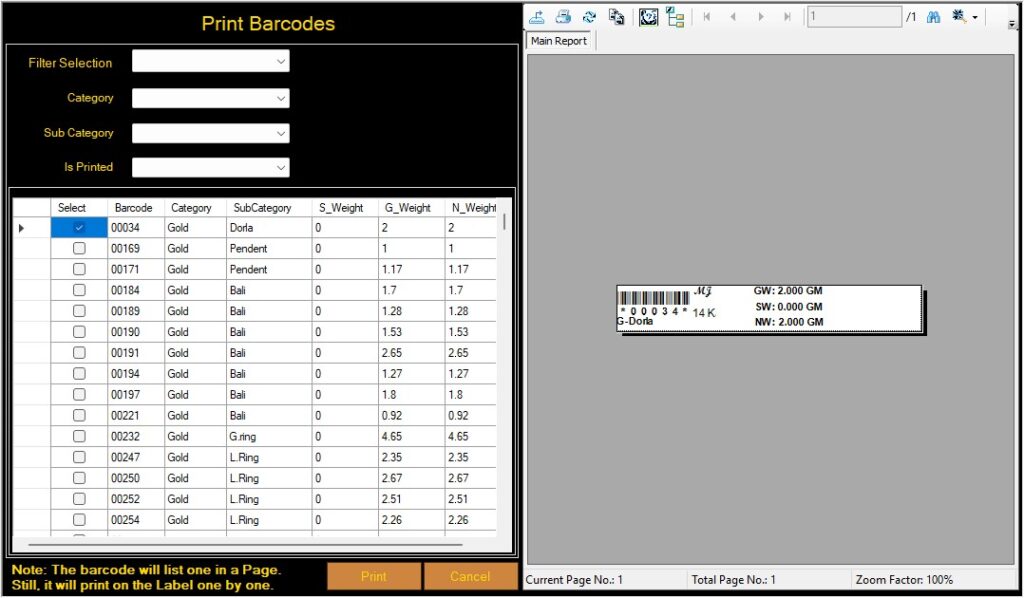
Our Barcode Identification interface for Jewellery Items
3. Sales Entry and Invoice Generation
Sales entry and invoice generation are central functions of a jewellery POS system.
A jewellery retailer should check whether the software supports the transaction details required by the business, including:
- Product details
- Gross and net weight, where applicable
- Metal rate
- Making charges
- Discounts, if applicable
- Applicable taxes
- Transaction total
- Payment information
The system should make it easy for staff to review the transaction before completing the invoice.
During a product demonstration, ask the provider to process a sample jewellery sale. Check whether the required fields are available, whether calculations follow the store’s billing process and whether the final invoice displays the necessary information.
For a more detailed explanation of the billing requirements, read our guide to jewellery billing software.
This article focuses on the point-of-sale workflow, while the billing guide covers the broader billing requirements of jewellery retailers.
4. Gold and Silver Rate Management
Gold and silver rates are important considerations when evaluating POS software for jewellery stores.
Retailers should check whether the system allows authorised users to maintain the rates required for their products and whether those rates can be used during the billing process.
Questions to ask include:
- Can gold and silver rates be maintained separately?
- Can rates be managed for the required categories or purities?
- Are rates entered manually or retrieved through an integration?
- How are rate changes reflected in the billing process?
- Can authorised users update the rates?
Not every jewellery POS system provides automatic live market-rate updates. Confirm whether rates are maintained manually, imported or updated through a specific integration.

Our gold/silver rate management interface
5. Customer Information and Transaction Records
Customer records help jewellery retailers maintain relevant customer information and retrieve it when required.
When comparing POS systems, check whether staff can:
- Add and edit customer records
- Select existing customers during billing
- Maintain the customer details required by the store
- Access available customer-wise transaction information
- View relevant customer reports, where supported
The level of customer management varies between products. Some POS systems provide basic customer records, while broader jewellery management solutions may offer additional customer-related modules.
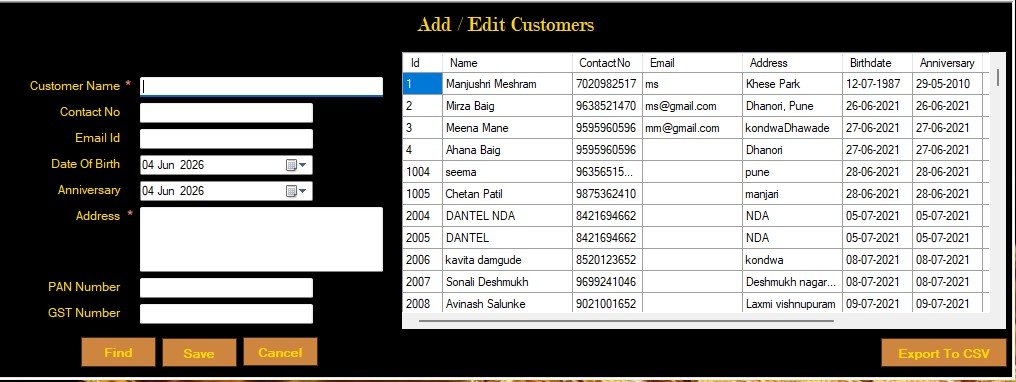
Cloudazia jewellery retail software customer management screen
6. Sales Reports and Business Information
Sales reports help jewellery retailers review recorded transactions and understand business activity over a selected period.
Depending on the software, useful reports may include:
- Date-wise sales reports
- Sales reports by item
- Customer-wise sales details
- Purchase reports
- Available stock reports
Before selecting a POS system, check which reports are included and whether users can filter them by date, item or customer.
Also verify whether reports can be exported into the formats your business uses. Ask the provider to demonstrate an actual report rather than relying on the report name alone.
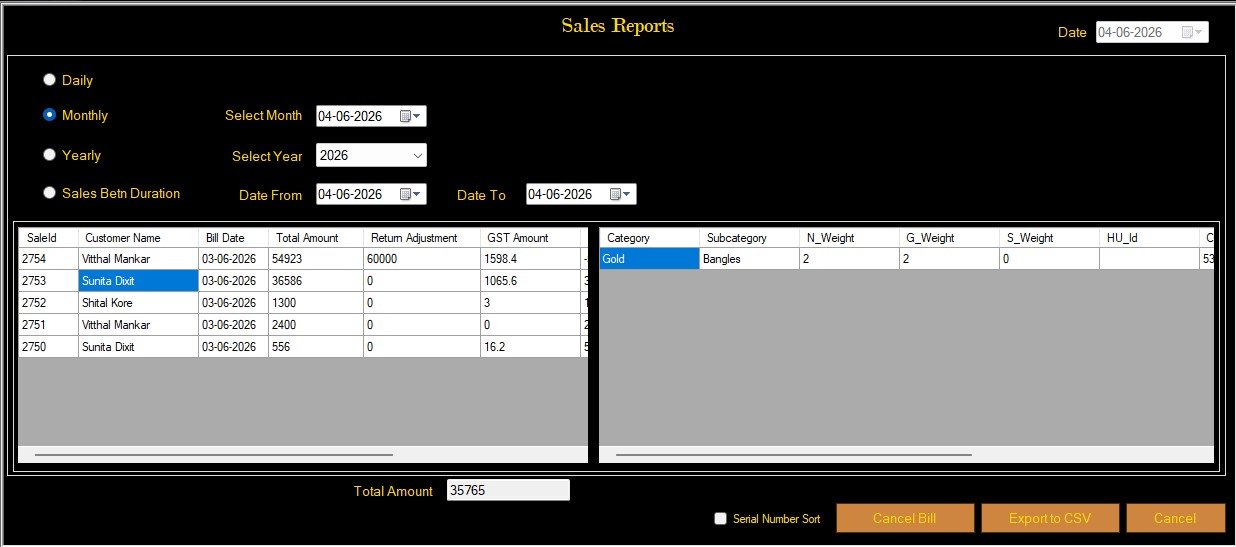
Our jewellery software sales report screen
7. Inventory Connection and Stock Visibility
A POS system becomes more useful when its sales records work with the store’s inventory records.
However, the extent of inventory integration varies between providers. Retailers should verify:
- Whether staff can search available product records during billing
- Whether the system connects sales with stock records
- What happens to stock after a completed sale
- How cancelled or corrected transactions are handled
- Whether purchase and stock-entry records are connected with sales
Do not assume that every POS system automatically updates stock after a transaction. Ask the provider to demonstrate the complete process.
For a closer look at product records and jewellery inventory organisation, read our guide to jewellery catalogue software.
Optional screenshot placement: Insert the original Cloudazia Available Stock Report or Add to Stock screen here.
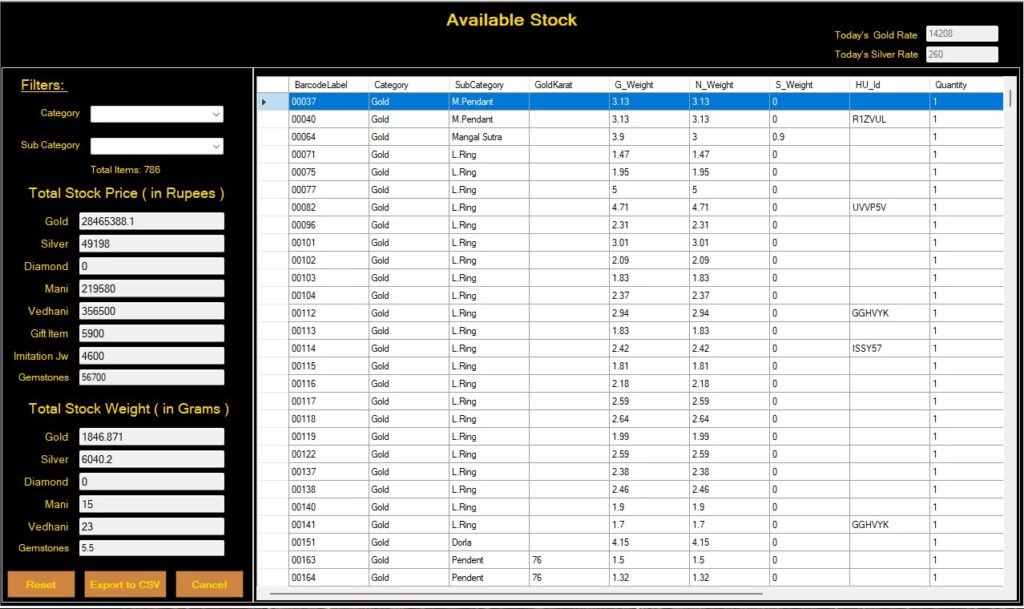
Our jewellery software available stock report dashboard
A Practical Jewellery POS Workflow: From Stock Entry to Sales Report
A useful way to evaluate jewellery POS software is to follow a product through the store’s actual workflow.
Instead of checking individual features separately, ask the provider to demonstrate how the different screens and records work together.
For example, a jewellery retailer can evaluate the following process:
Step 1: Enter the jewellery item
Check how the software records the product’s category, subcategory, purity, gross weight, net weight and other relevant details.
Step 2: Create and print the barcode
Check how the barcode is generated and whether the printed label can be associated with the correct product record.
Step 3: Locate the item during a sale
Ask the provider to demonstrate how staff search for or retrieve the product during sales entry. If barcode scanning is required, test it using compatible hardware.
Step 4: Enter and review the transaction
Check the available billing fields, pricing components, transaction totals and payment information.
Step 5: Review the sales record
Open the relevant sales report and verify what transaction information is available after the sale.
Step 6: Verify the inventory record
Check whether the sale is reflected in the relevant stock record and how the system handles corrections or cancellations.
This demonstration helps retailers understand whether the POS system supports a connected workflow or whether staff must maintain separate records.
For Cloudazia, you can use the actual Add to Stock, Print Barcodes, Sale, Today’s Rate and Sales Report screens to illustrate the corresponding capabilities. Only show steps that the product team has verified as part of the working software.
Jewellery POS Software vs. Regular Retail POS Software
A regular retail POS system is generally designed for products with relatively simple product and pricing structures. Jewellery retailers may require additional product information and pricing workflows.
| Comparison area | Regular retail POS | Jewellery POS system to evaluate |
| Product details | Product name, code and price | Metal, purity, weight and other jewellery details |
| Product identification | Standard product barcode | Barcode associated with jewellery product records |
| Pricing | Often based on a fixed item price | Support for the store’s jewellery pricing process |
| Invoice | General retail invoice | Fields required for jewellery transactions |
| Rate management | Usually general product pricing | Gold and silver rate management, where required |
| Reports | General sales reports | Item-wise and customer-wise sales information |
| Inventory | General stock records | Jewellery-specific stock information, where supported |
A general POS may be sufficient for stores with simple product requirements. A specialised jewellery POS may be more suitable when the business needs jewellery-specific product details, weight-related fields, rate management and barcode workflows.
For a broader understanding of retail store-management requirements, read our guide to jewellery shop software.
Common Mistakes to Avoid When Selecting Jewellery POS Software
Choosing a POS system based only on its advertised feature list can lead to problems later. Retailers should test the actual workflow before making a decision.
Here are some common mistakes to avoid:
1. Choosing a general POS without checking jewellery requirements
A system may support ordinary retail billing but lack the product fields required for jewellery transactions. Check the metal, purity, weight and pricing requirements before purchasing.
2. Assuming barcode printing means barcode scanning is supported
Barcode label creation does not automatically establish scanner compatibility. Test the complete process with the hardware your store plans to use.
3. Assuming gold and silver rates update automatically
Ask whether rates are manually maintained, imported or connected through an integration. Confirm the exact functionality.
4. Ignoring invoice calculations
Test a sample transaction and verify the item details, charges, applicable taxes and final invoice.
5. Not checking inventory behaviour
Ask what happens to the stock record after a completed sale, cancellation or correction.
6. Overlooking backup and data export
Check how business records can be backed up, restored and exported. Understand any limitations or additional charges.
7. Selecting software without a practical demonstration
A live demonstration using your store’s actual product and billing requirements is more useful than choosing a product based only on screenshots or promotional claims.
What Should Indian Jewellers Check Before Buying POS Software?
Use this checklist to compare different POS systems for jewellery stores.
| Feature to verify | Questions to ask the provider |
| Jewellery product details | Can the system maintain purity, gross weight and net weight? |
| Barcode functionality | Can it create, print and retrieve product barcodes? |
| Billing | Can it handle the fields required for jewellery transactions? |
| Rate management | Can gold and silver rates be maintained? |
| Customer records | Can staff maintain and retrieve customer information? |
| Sales reports | Can users view item-wise and customer-wise sales? |
| Inventory connection | What happens to stock records after a sale? |
| Hardware compatibility | Which barcode scanners and printers are supported? |
| Data backup | How can business records be backed up and restored? |
| Data export | Which export formats are available? |
| Training and support | What onboarding and ongoing support are provided? |
| Total cost | Are installation, hardware, integrations and customisation charged separately? |
A practical comparison method is to ask each provider to demonstrate the same sample transaction. Use a jewellery item with realistic product details, complete the sale, review the invoice and check the corresponding reports and inventory records.
For a wider comparison of available software options, explore our Top 10 Jewellery Software in India comparison guide.
How Does Cloudazia Retail Jewellery Management Software Support Retail Operations?
Cloudazia Systems offers Retail Jewellery Management Software designed to help jewellery retailers manage product stock, billing, barcode printing, customer information, orders and business reports.
The retail software includes capabilities such as:
- Managing jewellery, metal and gemstone stock
- Generating bills, invoices and receipts
- Creating and printing product barcodes
- Managing customer, vendor and order records
- Tracking sales and expenses
- Viewing available business reports
- Backing up, restoring and exporting data to supported formats
The retail interface includes screens for sales entry, Today’s Rate, barcode printing, stock records, customer management and sales reporting.
These screens help demonstrate the types of retail activities supported by the software. The exact workflow, integrations and configuration should be confirmed during a product demonstration.
Recommended product screenshots:
- Sale screen – show the available sales-entry fields.
- Print Barcodes – show barcode creation and printing.
- Today’s Rate – show the rate-management interface.
- Add/Edit Customers – show customer record management.
- Sales Report – show the available reporting information.
Visit the Cloudazia Retail Jewellery Management Software page to learn more about the product.
If you are evaluating a POS solution for your jewellery store, request a demonstration using your actual product and billing requirements.
Frequently Asked Questions About Jewellery POS Software
1. What features are important in a POS system for a jewellery store?
Important features include jewellery-specific product records, barcode functionality, sales entry, invoice generation, rate management, customer records and sales reports. Retailers should also verify inventory integration, hardware compatibility and data backup options.
2. Can jewellery POS software handle gold and silver billing?
A jewellery POS system may support gold and silver billing through product details, rate fields and pricing components. The exact calculations depend on the software and its configuration. Ask the provider to demonstrate a sample transaction using the metals and purities sold by your store.
3. Does jewellery POS software support barcode scanning?
Some jewellery POS systems support barcode-based product identification. Before purchasing, confirm that the software can generate and print the required labels, retrieve the correct product record using a scanner and work with your preferred hardware.
4. Can a POS system generate GST invoices for jewellery sales?
A POS system may generate invoices with applicable GST details, but retailers should verify that its tax configuration follows the rules relevant to their transactions.
According to the CBIC sectoral FAQ, GST is payable at 3% of the total transaction value of jewellery supplied to an end consumer, whether making charges are shown separately or not. The FAQ distinguishes this from job-work charges, which have a separate treatment.
Retailers should confirm their applicable tax treatment with a qualified tax adviser and check the software’s invoice configuration.
Official reference: CBIC – Sectoral FAQs
5. What is the difference between a POS system and complete jewellery management software?
A POS system mainly supports sales transactions at the counter. A complete jewellery management solution may also include inventory, purchase, customer, vendor, order and business-reporting modules. The features available depend on the provider and the software edition.
6. Can jewellery POS software work without an internet connection?
Offline availability depends on the software’s architecture and configuration. Some products support local or offline operation, while others require an internet connection for important functions. Ask the provider which activities remain available during an internet outage and how data is synchronised, if applicable.
7. How should a jewellery retailer compare POS software before buying?
Compare product details, barcode functionality, invoice fields, rate management, customer records, reports, inventory connection, hardware compatibility, backup, support and total cost. Ask each provider to demonstrate the same sample jewellery transaction before making a decision.
8. Is jewellery POS software suitable for small jewellery shops?
It can be suitable for small jewellery shops if the software matches their billing process, product range and budget. Smaller retailers should prioritise the features they actually need, ease of use, reliable records, support and the total cost of ownership.
Choose a POS System That Fits Your Jewellery Store
The right jewellery POS system should support the way your store identifies products, processes sales, prepares invoices and reviews transaction records.
Before selecting a solution, evaluate its product fields, barcode workflow, rate management, reporting options, inventory connection and customer records. Most importantly, test the complete sales process instead of relying only on a provider’s feature list.
Cloudazia Systems provides Retail Jewellery Management Software with billing, barcode printing, stock, customer and reporting capabilities.
Visit the Cloudazia Jewellery Management Software page or contact the team to discuss your store’s requirements and arrange a product demonstration.